
What Are AI Agents? A Beginner’s Guide to How They Work

What Are AI Agents? A Beginner’s Guide (2025)

What Are AI Agents? Everything Beginners Should Know

Multi-Agent Systems | AI vs Automation | Blockchain App Development

Curious to know about what are AI agents and how they work? Welcome to our AI agents guide, created to help beginners and business leaders unravel the latest advancements in autonomous digital agents revolutionizing the way businesses and individuals tackle tasks.

These intelligent digital collaborators autonomously make decisions, learn from real-time data, and act proactively to achieve goals. Unlike traditional tools that require explicit instructions, AI agents adapt across various domains, continuously improving with minimal human intervention. They boost productivity, reduce costs, and enhance accuracy around the clock, transforming everything from fraud detection in banking to personalized customer experiences.

In this guide, you’ll learn what AI agents are, how they differ from other artificial intelligence tools, their key components, practical applications across industries, benefits, challenges, and what to expect in the future.

What are AI Agents?

AI agents are advanced software programs that perform tasks autonomously to achieve specific goals. They make decisions based on predefined objectives and real-time data. These agents rely on AI frameworks such as machine learning (ML) models and natural language processing (NLP) to properly understand and handle diverse inputs, responding accordingly. Unlike traditional programs, which depend on humans to carry out predefined tasks, AI bots can interpret their environment. They make choices based on available data and act proactively rather than simply reacting to user instructions.

Key features of an AI agent system include:

  • They can work independently without needing much help from people.
  • They keep improving their performance by using machine learning algorithms and AI in software development.
  • They understand and communicate like humans do.
  • They quickly analyze information and respond immediately.
  • They can handle and adapt to multiple tasks across different domains.
  • They work smoothly with humans and ask for help when things get tricky.

In banking, AI agents help improve customer service and security. They handle common questions anytime, like checking account info or resetting passwords. They also monitor transactions to spot possible fraud and alert humans when needed. This saves time, cuts costs, and protects customers. AI agents can even assist loan officers by quickly reviewing financial documents, speeding up decisions. Overall, AI agent development in financial services focuses on creating the best AI agents designed for precision and compliance.

How AI Agents Differ From Other AI Tools

AI agents represent an advancement over familiar AI tools like chatbots and automation scripts:
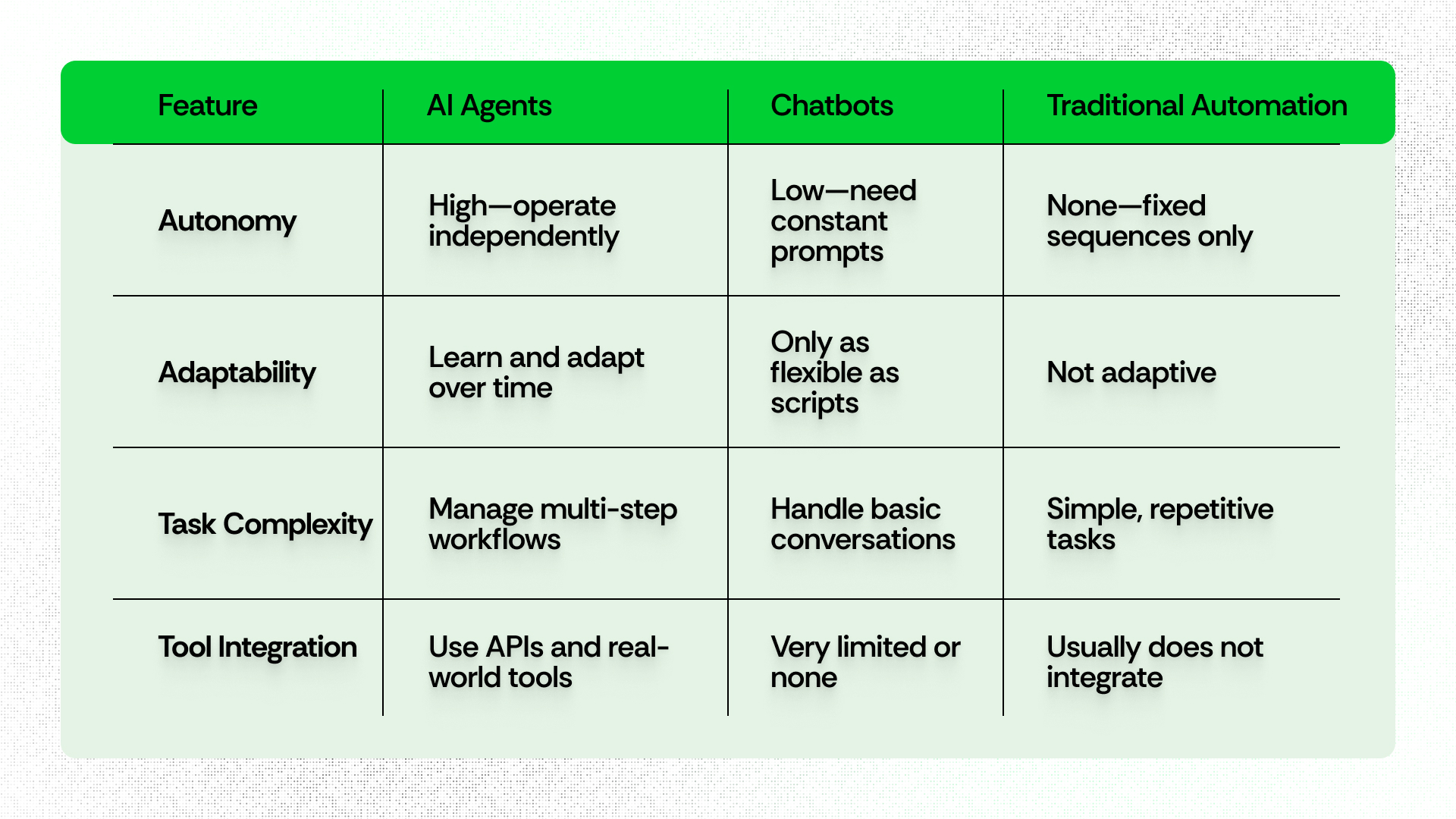
Traditional Automation Vs Virtual Bots

When comparing AI agents vs chatbots, it becomes clear that while chatbots and scripts are like appliances that perform one task on request, AI agents are like skilled assistants, capable of context-switching, prioritizing, and initiating new actions as situations evolve.

An intelligent agent in AI can analyze complex scenarios and autonomously make decisions, often combining abilities seen in both agentic AI vs generative AI: agentic AI focuses on purposeful autonomous decision-making, while generative AI emphasizes content creation and response.

Core Components of AI Agents:

There are many kinds of AI agents with different capabilities, and their behavior depends on the agentic architecture they operate within. However, despite this variety, these agents share key components that are essential for building adaptive and intelligent systems. Let’s explore each of these components below.

  • The Brain (Reasoning Engine): This usually involves large language models (LLMs) or similar advanced models, enabling nuanced understanding, planning, and decision-making.
  • Memory: Agents store information about past tasks, user preferences, and outcomes. This memory can be short-term (during a session) or long-term (across weeks and months), allowing more personalized and contextual behavior.
  • Knowledge Base: Some agents tap into live data feeds, company databases, documentation, or even the internet to bring relevant knowledge to every task.
  • Tools and APIs: To accomplish objectives, agents need to act—placing orders, sending emails, updating calendars, or controlling physical devices via APIs, applications, or robotic components.
  • Prompting/Instruction System: Complex instructions are broken down by the agent, which identifies the necessary steps, sequences, and fallback plans autonomously.
  • Sensors and Actuators: In robotics or an Internet of Things (IoT) platform, agents gather data from their environment (temperature, photos, audio) and manipulate it using actuators (motors, switches).

Benefits of AI Agents

AI agents have become a big help for all kinds of businesses because they make work easier and faster. These smart programs take care of tasks that used to take a lot of time or were prone to mistakes, freeing up teams to focus on what really matters.

Have a glance at AI agents benefits and how they are making a real difference:

  1. Boosting Productivity: AI agents handle boring, repetitive jobs like data entry or scheduling, so people can spend their time on bigger, more important projects. They keep things running smoothly by automating processes without needing a lot of oversight.
  2. Improving Accuracy: These agents are great at spotting errors and catching details humans might miss. Whether it’s crunching numbers, checking facts, or reviewing data, AI agents deliver dependable results that save time and avoid costly mistakes.
  3. Working 24/7: Unlike humans, AI agents don’t need breaks or sleep. They can provide support and manage tasks all day and night, which means businesses never miss a beat when it comes to customer service or backend work, even outside regular office hours.
  4. Cutting Costs: Since AI agents can do in minutes what might take humans hours, companies save money on labor and reduce errors that might lead to extra expenses. This makes budgets stretch further without sacrificing quality.
  5. Growing with Your Business: As your business grows, AI agents can easily adjust to handle more work or new challenges. This flexibility helps companies stay efficient and keep up with demand, no matter how fast they expand. Simply put, leveraging artificial intelligence business through AI agents enhances scalability, customer experiences, and operational excellence.

In summary, AI agents not only automate tasks and improve productivity but also elevate decision-making, customer experience, scalability, security, and adaptability, making them transformative tools for businesses in 2025.

How do AI Agents Work?
How do AI Agents Work

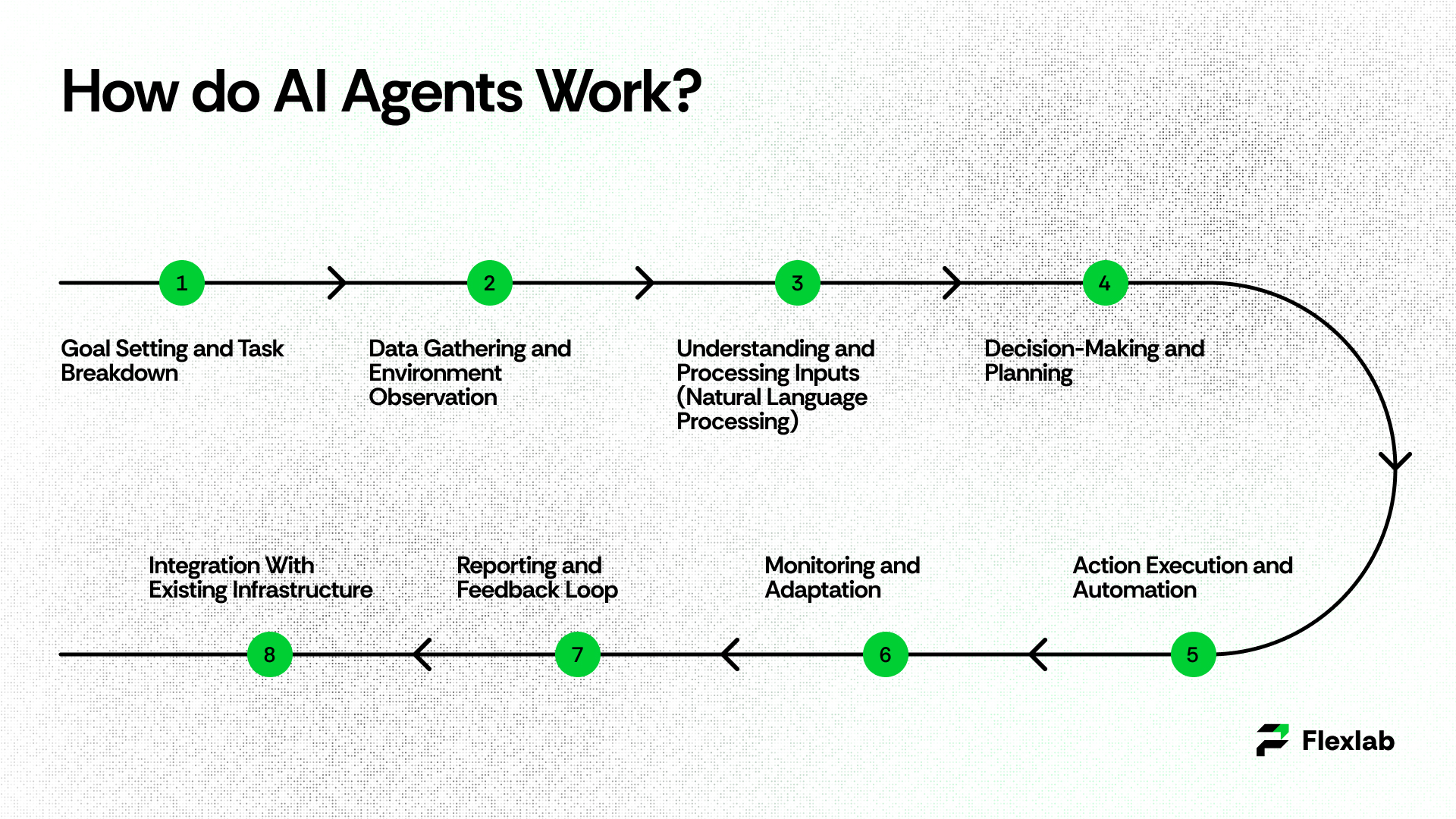
Below is a typical, detailed workflow that shows how modern AI agents operate from start to finish:

1. Goal Setting and Task Breakdown

AI agents work by autonomously performing complex tasks through a series of coordinated steps powered by advanced technologies like large language models (LLMs), machine learning, and natural language processing. The workflow begins when a clear goal or instruction is set, such as “handle customer support” or “manage inventory.” The agent analyzes this goal and breaks it down into smaller, manageable subtasks. 

For example, it might categorize requests, retrieve relevant data, or perform specific actions. This breakdown allows the agent to prioritize tasks and plan a logical sequence of operations to efficiently achieve the overall objective.

2. Data Gathering and Environment Observation

Next, the agent collects the necessary data inputs from various sources, including databases, APIs, user inputs, sensors (in case of physical agents), or real-time systems. AI agents continuously observe their environment to understand context and any changes, which is vital for adapting decisions and actions. This step often involves data integration techniques to pull in both structured and unstructured data needed for processing.

3. Decision-Making and Planning

Once the inputs are processed, AI agents apply decision-making algorithms and reasoning engines—often powered by large language models, reinforcement learning, or rule-based systems—to evaluate the gathered data. The agent determines the best course of action for each subtask and plans multi-step workflows. Sometimes it includes fallback or alternative strategies if obstacles arise. For complex tasks, the agent prioritizes, sequences, and may loop back on subtasks based on interim results and user or system feedback.

4. Action Execution and Automation

After planning, the AI agent automates task execution. This can involve Robotic Process Automation (RPA) tools to perform rule-based repetitive tasks like data entry or report generation, function calls and APIs to interact with software systems, databases, or external tools, and—for agents tied to physical systems—using actuators or sensors to manipulate hardware or environments. Actions such as sending emails, updating records, triggering workflows, or controlling devices are performed autonomously or semi-autonomously as required.

5. Monitoring and Adaptation

Throughout the process, the AI agent monitors outcomes and system feedback to ensure that objectives are being met. These agents learn from both successes and failures, using machine learning to improve future decisions and adapt to changing data. When tasks are too complex or need human judgment, the AI agent escalates them to a person or a more advanced system, ensuring smooth collaboration between AI and humans.

6. Reporting and Feedback Loop

Upon completing tasks, AI agents generate performance reports and summaries, providing transparent insights into actions taken and results achieved. This documentation supports auditing, compliance, and continuous improvement efforts. Feedback from users or operational data then feeds back into the system to refine models, update workflows, and enhance the agent’s capabilities over time.

Real-World Use Cases of AI Agents (2025)
Use Cases of AI Agents

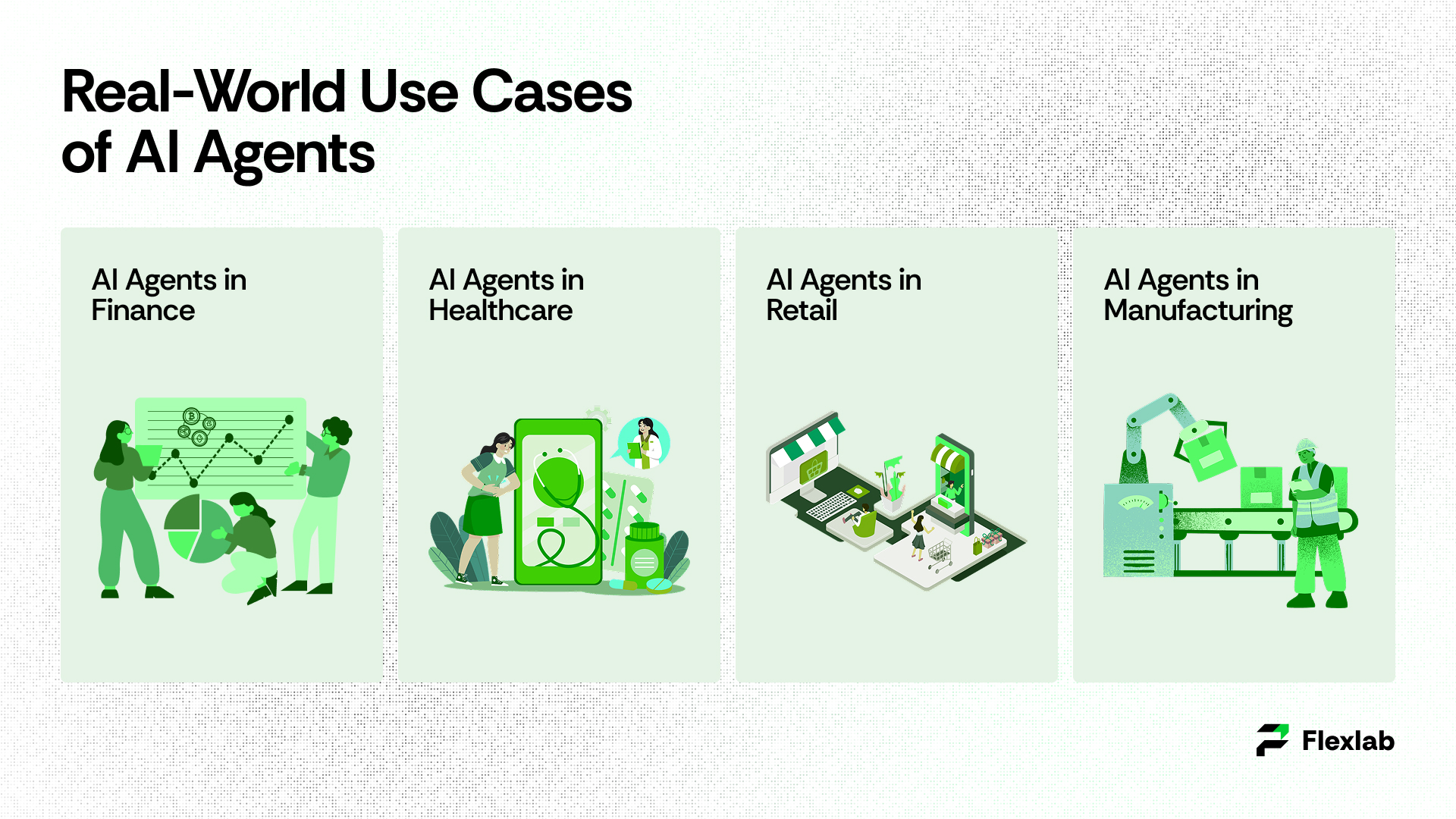
Different types of AI agents are making a big difference in many industries. They take care of tasks, save time, and help work get done better. Let’s check out some examples of how AI agents are being used in different fields.

AI Agents in Finance

AI agents in finance are streamlining operations and enhancing customer experience. For example, Bank of America’s Erica has surpassed 2 billion interactions, helping over 42 million customers with balance inquiries, bill payments, and spending tracking. Financial institutions now use virtual agents for fraud detection, customer service automation, and document processing, leading to higher accuracy and operational cost reductions. Automated invoice handling and expense management with AI agents have been shown to cut processing costs by up to 70% and boost accuracy beyond 90%.

AI Agents in Healthcare

In healthcare, AI agents are increasingly assisting with diagnostics, administrative automation, and patient support. For example, Babylon Health uses an AI assistant to instantly analyze symptoms and provide guidance, easing the burden on staff and speeding up care. Moreover, advanced systems like Massachusetts General Hospital’s AI diagnose conditions with over 90% accuracy, detecting lung nodules at 94% versus 65% for radiologists. As a result, AI-driven automation and digital health assistants could save the U.S. healthcare system up to $150 billion annually.

AI Agents in Retail

Retail businesses, for instance, leverage AI agents to provide personalized customer experiences and streamline operations. For example, Amazon’s Rufus is a conversational AI tool that helps identify suitable products and make personalized recommendations. Studies show that conversational agents in retail can lead to a 12% increase in customer satisfaction and reduce purchase abandonment by almost half. AI agents also optimize inventory and customer support, ensuring 24/7 service without overloading staff.

AI Agents in Manufacturing

Manufacturing companies use smart AI assistants for real-time data analysis, predictive maintenance, and process automation. Siemens’ AI-powered assistants assist engineers by generating code and diagnosing machine faults, reducing manual effort. Predictive maintenance agents can lower unplanned downtime and save up to 14% on costs. Meanwhile, AI-enabled quality control delivers up to 99.9% defect detection accuracy, leading to greater efficiency and fewer costly errors.

Limitations and Challenges

AI agents hold significant promise; however, they also come with notable limitations and challenges. One major issue is reliability. Even the most advanced AI agents can misunderstand rare or unusual cases or behave unpredictably in new situations. Therefore, regular monitoring and fallback plans are essential. In addition, privacy and security represent another critical challenge. Since these agents often require access to sensitive data to perform effectively, this demand calls for strong encryption, authentication, and strict compliance with regulations.

Human oversight is also necessary, especially for high-stakes decisions such as financial approvals, legal advice, or healthcare interventions. In these cases, human review or intervention ensures safety and correctness. Finally, intelligent digital agents must continuously adapt. Outdated rules, stale data, or evolving business requirements can degrade their performance over time. This makes ongoing review and retraining essential to maintain effectiveness. Moreover, this awareness of the risks of AI agents guides the work of any serious AI agent development company and reflects industry best practices for safer deployment.

What Can We Expect in the Future?
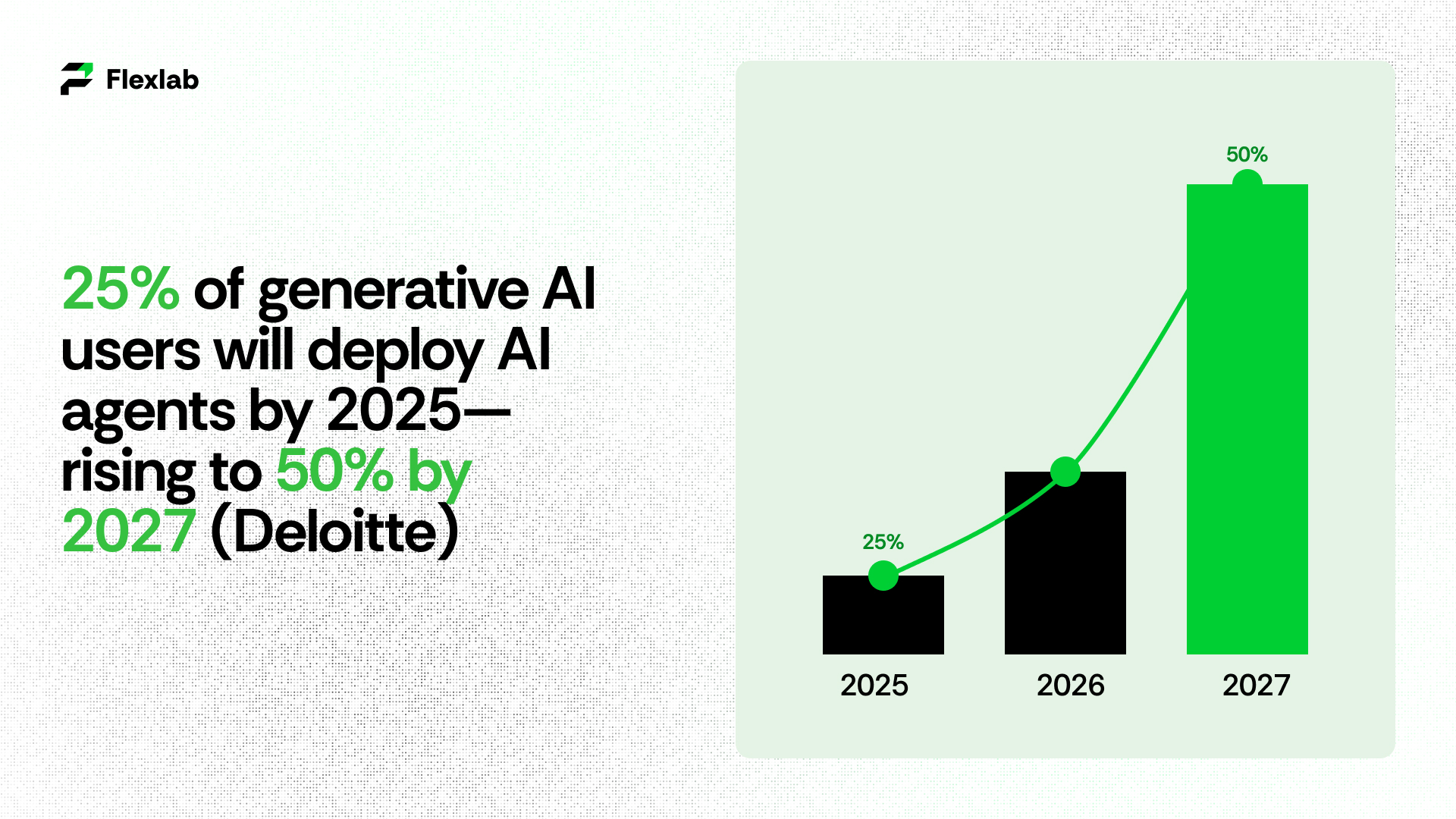
Market Size of AI Users

Many organizations are gearing up to adopt AI agents. According to a Capgemini report, about 82% of companies plan to implement AI agents by 2026. Deloitte also predicts that 25% of enterprises using generative AI agents will deploy AI agents by 2025, and this number is expected to grow to 50% by 2027. These AI agents won’t just be for general use; they will play bigger roles in specialized fields like finance, retail, and healthcare.

Looking ahead, AI-powered agents are evolving in some exciting ways. Instead of just responding when asked, they’ll start anticipating needs and solving problems proactively. They’ll offer more personalized experiences by learning your habits and preferences. For example, they might recommend products based on what you browse or provide tailored health advice. Emotional intelligence will improve too, meaning they can recognize when someone might be upset or stressed. They will respond with empathy, which could make a big difference in mental health support.

Smart digital helpers will get better at communicating by using a mix of text, voice, images, and video. As a result, interactions will feel more natural and effective. Furthermore, with deeper connections to smart devices and the Internet of Things (IoT), these agents will help automate daily tasks in smart homes, offices, and even entire cities. For instance, they can manage your shopping list and handle travel plans automatically.

At the same time, there’s a strong focus on making AI responsible and ethical. Developers and companies are working to reduce biases and promote fairness. They also aim to ensure AI systems are trustworthy and inclusive. This ethical approach is essential for widespread acceptance and beneficial integration of AI in society.

Overall, AI agents are set to become smarter, more intuitive partners in both work and everyday life. They will transform how we interact with technology, making many tasks easier and more efficient.

Unlock Seamless Automation and Growth with Flexlab AI Agents

Flexlab Automation System

At Flexlab, we offer comprehensive AI agent development services. We also specialize in developing artificial intelligence AI solutions powered by cutting-edge AI and blockchain technologies that transform how businesses operate and grow. By seamlessly integrating advanced automation, secure blockchain platforms, and an intelligent agent in AI systems, we help organizations optimize workflows, enhance decision-making, and deliver personalized, real-time experiences that drive efficiency and innovation. 

Our expert team ensures your digital solutions not only perform flawlessly across web and mobile but also remain secure, scalable, and continuously optimized through proactive maintenance and upgrades. We provide tools, including  AI agent builders platform and access to robust AI agent marketplaces, to empower businesses

Partnering with Flexlab means unlocking the full potential of AI agents to revolutionize your operations, reduce costs, and stay ahead in today’s fast-evolving digital landscape. Contact us today or explore our portfolio to see how we can help drive your business forward.

Ready to Grow Your Business?

📞 Book a FREE Consultation Call: +1 (416) 477-9616

📧 Email us: info@flexlab.io

Discover More:

How to build an AI agent in 2025?

To build an AI agent in 2025, start by clearly defining your agent’s purpose and primary goals. Next, collect and prepare high-quality, task-specific data to ensure effective training. After setting up, proceed to train, test, and refine your agent to meet the desired performance benchmarks. Finally, deploy your AI agent, continuously monitor its performance, and regularly update it to improve accuracy and ensure it stays aligned with evolving business needs.

Who are the Big 4 AI agents?

The Big 4 AI agents in 2025 are OpenAI’s Operator, Devin AI by Cognition Labs, Claude by Anthropic, and Amazon’s Nova Act. These leading virtual agents offer advanced automation, adaptability, and multi-step task handling, powering intelligent workflows and autonomous decision-making for enterprises.

Can I build AI agents without coding?

Yes, you can build AI co-workers without coding in 2025, thanks to powerful no-code platforms. These tools offer drag-and-drop interfaces, pre-built templates, and easy integrations with popular apps like CRMs and messaging platforms. You can also test and deploy agents that handle complex tasks without writing code.
7 Responses

  1. Informative post! I was actually searching for
    a tutorial on how to get access to OurDream AI VIP features.
    Appreciate it for sharing this valuable information.

    This guide really helped me to understand OurDream AI without issues.

    I’ll certainly share this page for future reference.

    Continue posting helpful stuff!

Leave a Reply

Your email address will not be published. Required fields are marked *

10 Essential Day Trading Strategies for Beginners

Crypto WalletsCrypto Trading BotWhite Label Crypto Exchange

Day trading strategies are available for anyone interested in making a profit from short-term market moves while taking control of their financial future. However, success requires structure, discipline, and a clearly defined plan. With the right approach, traders can work from anywhere while managing trades efficiently and strategically.

As markets evolved, and 2026 began, the market environment had noticeably changed. As a result, fast-moving AI-driven algorithms, high trading volume, and real-time global news mean beginners need structure more than ever. Without a clear plan, day trading often becomes inconsistent and emotional. Understanding proven trading techniques substantially builds confidence and removes guesswork.

With that foundation in place, this guide presents 10 practical, beginner-friendly strategies for modern markets. Each one focuses on clarity, disciplined risk management, and real-world application so you can easily learn before putting real money at risk.

Choosing the Battle: Which Strategy Fits Your Style?

Choosing the Right Day Trading Strategy in 2026

In the 2026 market, one-size-fits-all is a myth. The rapid rise of AI-driven liquidity and predictive analytics has made the markets more efficient. Furthermore, it has also created distinct areas of opportunity for retail traders who know where to look. Day trading is just one of several types of trading, alongside swing trading, position trading, and long-term investing, each requiring a different mindset and time commitment.

In practical terms, before we explore the technical mechanics of each setup, it’s vital to understand that your success depends on matching a strategy to your daily schedule and personal risk tolerance. This alignment also depends on the financial instruments you trade, such as stocks, futures, forex, or cryptocurrencies.

Whether you’re a morning person looking to capitalize on the 9:30 AM opening bell or a systematic thinker who prefers the set-it-and-forget-it nature of moving averages, the following breakdown will help you identify your best entry point into the world of day trading.

Strategy Comparison at a Glance

Strategy Complexity Time Commitment Market Condition Best For
Trend Trading Low Moderate Strong Trends Beginners
Breakout Trading Moderate Moderate High Volatility Momentum Seekers
Mean Reversion Moderate High Overextended Patient Traders
Scalping High Extreme High Liquidity Fast Thinkers
Gap and Go Moderate Low (9:30 AM) Morning Moves Morning Traders
Pullback Trading Low Moderate Healthy Trends Disciplined Entry
Range Trading Low High Sideways Markets Quiet Markets
News Trading High Low (Burst) Major Events Reactive Traders
MA Crossover Low Moderate Trending Markets Systematic Fans
Reversal Trading High Moderate Exhausted Trends Contrarians

How to Navigate These Strategies

At a high level, the above table presents a bird’s-eye view; the secret sauce is in the execution. Below, we break down each of these 10 strategies into three critical components: 

  • The Setup (what to look for), 
  • The Tools (what indicators to use), and 
  • The Reality Check (a common beginner pitfall to avoid).

More importantly, don’t try to master all ten at once. Pick one that fits your current schedule, such as Gap and Go if you only have an hour in the morning, and master it in a simulator first. One of the most practical day trading tips for beginners is to build consistency with a single setup before expanding further.

The Anatomy of a Trade: Your 2026 Blueprint 

The Anatomy of a Trade: Your 2026 Blueprint 

Before executing any trade, you must visualize the three pillars of a professional setup. From a risk perspective, in a market dominated by algorithms, entering and hoping is a guaranteed way to blow an account. Using fractional shares allows beginners to apply these day trading strategies/principles precisely, even when trading higher-priced stocks with limited capital.

  1. The Entry Trigger: The exact price point where your strategy is confirmed. Clearly defining your entry points prevents impulsive trades and improves execution discipline.
  2. The Stop Loss: Your safety net, the price at which your market thesis is proven wrong.
  3. The Take Profit: Your target. We recommend a 1:2 risk-to-reward ratio as the baseline for beginners.

The 1% Rule: A Survival Guide for Beginners 

The 1% Rule: A Survival Guide for Beginners

In reality, in the volatile 2026 landscape, the difference between a professional and a gambler is position sizing. This principle is one of the foundational day trading rules that professionals follow to protect capital. This rule ensures that no single market move can end your trading career. When trading on margin, ignoring risk limits can rapidly magnify losses, making strict discipline essential.

How it works in practice:

  • Account Balance: $10,000
  • Max Risk per Trade (1%): $100
  • The Calculation: If your stop loss is $2 away from your entry, you buy exactly 50 shares ($100 risk ÷ $2 distance).

By following this evaluation, you would need to lose 100 trades in a row to blow your account. This discipline allows your strategy’s edge to play out over time.

10 Proven Day Trading Strategies That Work in 2026

1. Trend Trading (The Trend Is Your Friend)

Trend trading is one of the most reliable day trading strategies for beginners because it aligns with the market’s natural direction. As a result, traders avoid emotional reversals and focus on momentum. Instead of guessing reversals, you trade with momentum, which simplifies decision-making and reduces impulsive trades.

  • Spotting the Trend

A healthy trend forms higher highs and higher lows in an uptrend or lower highs and lower lows in a downtrend. Think of price action as a staircase; consistent steps give a surety of direction.

  • Tools and Timing

The 200-period EMA is the primary trend filter. When the price stays high, it focuses on long trades. On the contrary, it focuses on shorts. Advanced traders sometimes combine moving averages with Ichimoku trading to confirm trend strength and momentum. The 20-period moving average helps identify pullback entries within the trend.

  • Real-World Case

During tech sector rallies, traders who entered on pullbacks to the 20 MA captured steadier gains than those chasing breakouts near the highs.

2. Breakout Trading (Catching the Big Move)

By contrast, breakout trading targets assets that are about to make strong directional moves. It’s popular because it captures momentum rather than slow price action.

  • Identifying Breakouts

Search for stocks consolidating between clear support and resistance. A valid breakout occurs when the price closes above resistance with strong trading volume. This approach is a classic form of momentum trading, designed to capture rapid price expansion. Low volume often signals a fake move.

  • Tools and Confirmation

Volume is the key confirmation tool. Many traders wait for a breakout retest before entering, which helps reduce the number of false entries.

  • Real-World Example

A biotech stock, which had been trading between $42 and $44, broke above $44 with heavy volume. Traders who waited for confirmation captured a clean daily fluctuation, while early entries were stopped out.

3. Mean Reversion Trading (The Rubber Band Strategy)

Mean reversion is one of the most misunderstood trading techniques, yet it remains effective when used correctly. When a price swings too far, too fast, it often snaps back toward its average.

  • When Price Moves Too Far

In numerous instances, markets rarely move in straight lines. Sharp moves typically attract late buyers or sellers, pushing prices beyond reasonable levels. Mean reversion traders look for exhaustion, not prediction.

  • The Core Tool: RSI

The Relative Strength Index (RSI) helps spot extremes. Readings above 70 suggest overbought conditions, while readings below 30 indicate oversold levels.

  • Managing Risk

This strategy requires great patience. Waiting for the price to slow down before entering improves consistency and protects capital.

4. Scalping (Fast Trades, Small Profits)

Scalping focuses on capturing small price movements within seconds or minutes. However, this day trading strategy demands speed, discipline, and precise execution. The goal is consistency, not large wins.

  • Speed and Discipline

Under fast-moving conditions, scalping works best during peak market hours when liquidity is high. These peak trading hours provide tighter spreads and faster order execution. Fast execution and clean charts matter more than complex technical analysis.

  • Tools That Matter

Short-term moving averages and volume spikes are common tools because profits are lower; commissions and platform speed both play a significant role.

  • A Common Beginner Mistake

Overtrading and ignoring stop losses. One bad trade can wipe out several small wins, making discipline essential.

5. Gap and Go (Trading the Opening Bell)

Typically, a gap occurs when a stock opens significantly higher or lower than its previous closing, usually due to news or earnings.

  • Finding the Right Gap

The best setups show strong pre-market volume and clear catalysts. Many gap opportunities appear in penny stocks, though they carry higher volatility and execution risk. Liquid stocks tend to perform more accurately than thinly traded names.

  • Executing the Trade

Most traders focus on the first 5–15 minutes after the opening. A break above the initial range with momentum often leads to continuation.

6. Pullback Trading (Entering at a Better Price)

Pullback trading rewards patience. Instead of chasing price, you wait for a retracement within an existing trend.

  • Why Pullbacks Matter

Strong trends pause before continuing. These pauses offer lower-risk entry points and reduce instinctive decision-making.

  • Tools for Entry

Common tools include Fibonacci retracements (50% and 61.8%) and short-term moving averages.

  • Mistake to Avoid

Entering too early. Waiting for confirmation improves results.

7. Range Trading (Sideways Markets)

During consolidation phases, range trading works best when markets lack direction. Price tends to bounce between support and resistance.

  • Identifying a Range

A valid range forms when price repeatedly respects the same upper and lower levels.

  • Helpful Tools

Bollinger Bands help visualize range extremes. Some traders also apply pivot point trading to identify short-term support and resistance levels. Low volume supports range behavior, while rising volume warns of breakouts.

8. News Trading (React, Don’t Predict)

That said, news trading can be risky for beginners. In contrast, structured day trading strategies such as trend trading or pullbacks offer more predictable outcomes. Prices often move violently right after the major announcements.

  • How News Affects Price

Algorithms react first, causing sharp slashes. Waiting for the initial reaction to settle provides clearer opportunities.

  • Risk Control

News can ignore technical levels. This risk is amplified in over-the-counter markets, where liquidity can disappear instantly. Tight stop losses and strong trading psychology are mandatory.

9. Moving Average Crossover (Rule-Based Trading)

This strategy uses predefined rules to reduce sentiment-driven trading.

  • How It Works

A fast-moving average rising above a slower one indicates a possible buy; in contrast, dropping below suggests a sell. 

  • Why Beginners Like It

Clear rules help to maintain discipline, especially during strong trends.

10. Reversal Trading (The Contrarian Approach)

By definition, reversal trading goes against the trend and carries higher risk.

  • Why It’s Challenging

Trends usually last longer than expected. Trying to call tops or bottoms too early leads to losses.

  • When It Makes Sense

Extreme price moves combined with candlestick patterns like hammers or shooting stars can signal exhaustion. Tight stops are essential.

The 2026 Infrastructure: Powering Your Strategy

Power Your 2026 Trades with High-Speed AI

At the same time, in today’s market, having a great strategy is only half the battle.  Professional day trading software is essential for executing trades with speed and reliability.

To execute these 10 techniques or day trading strategies effectively, your technical setup must be as sharp as your analysis. High-frequency AI algorithms now account for over 70% of daily volume, meaning speed and reliability are non-negotiable.

Execution Platforms: Utilize institutional-grade platforms such as TradingView or Interactive Brokers that support real-time API hooks. These tools are widely regarded as some of the best online trading platforms for active traders.

Edge Computing: Many pro traders now use Virtual Private Servers (VPS) to ensure their trades execute in milliseconds. Working with the best brokers for day trading further reduces slippage and execution delays. Even if their home internet sparks.

AI-Assisted Scanning: Don’t waste hours hunting for setups. Modern tools like Flexlab’s proprietary scanners can monitor 500+ tickers simultaneously, alerting you only when a strategy like the Gap and Go or Mean Reversion meets your exact criteria.

Beyond the Bot: Why Human Intuition Is Still the Greatest Asset

While automation excels at rocket speed. Within a millisecond, high-frequency algorithms can process a million data points; they only lack the one thing that defines the world’s most successful traders: context. In 2026, the most profitable strategies are augmented. They combine the raw speed of AI with the nuanced judgment of a human brain.

While a bot can identify a staircase trend, it cannot sense the subtle shift in market sentiment during a geopolitical event when a breakout is driven by social media hype rather than institutional volume. Success doesn’t come from fighting the machines; it comes from utilizing Flexlab’s engineering to automate the complaint work, freeing you to focus on high-level decision-making where the real value is created.

2026 Market Outlook: Why Traditional Methods Are Evolving 

Looking ahead, the trading landscape of 2026 is defined by predictive liquidity and volatility compression. Unlike the markets of five years ago, today’s price action is heavily influenced by large-scale AI models that can front-run traditional retail indicators.

To survive, beginners must shift from static analysis to dynamic execution. This means not just looking for an RSI crossover but understanding the volume profile behind it. We expect 2026 to favor those who utilize hybrid systems and strategies that are technically sound but flexible enough to adapt when institutional algorithms shift their bias.

From Manual to Algorithmic: Scaling Your Success

Over time, most beginners start with manual execution, staring at charts and clicking buttons. However, the true path to consistent profitability in 2026 is automation. Manual trading is likely to lead to fat-finger errors and emotional exhaustion.

By converting these 10-day trading strategies into automated agentic workflows, you remove human bias entirely. Imagine a system that never sleeps, calculates your risk-to-reward ratio instantly, and executes a Moving Average Crossover at 3:00 AM while you rest. This isn’t just a convenience; it’s how you scale a small account into a professional operation.

Dominate the Markets: Secure Your 2026 AI Strategy with Flexlab

Dominate the Markets in 2026 with Flexlab’s AI Trading Systems

Average traders rely on luck, but elite performers rely on architecture. In a market dominated by lightning-fast algorithms, you need more than just a plan; you need a technical advantage. Flexlab engineers the high-performance frameworks and AI-driven workflows required to outpace the competition. Stop reacting to the market and start commanding it with systems built for precision, scale, and relentless reliability.

Whether you are looking to automate complex trading logic or deploy sophisticated agentic workflows, we possess the expertise to turn your vision into a live, high-speed reality.

Ready to Automate Your Day Trading Strategies?

📞 Book a FREE Consultation Call: +1 (201) 347-8591
📧 Email us: info@flexlab.io

Elevate Your Technical Infrastructure

Success in the digital age demands a partner who understands the intersection of finance and cutting-edge automation. You can explore the full spectrum of our high-tier services to understand how we architect elite solutions or navigate through our portfolio to examine the high-speed automation projects we’ve already successfully deployed. If you are ready to stop theorizing and start building, contact us immediately to initiate your transformation. We also invite you to sharpen your edge by absorbing the technical insights found on our blog or by syncing with our latest breakthroughs on LinkedIn.

Expand Your Knowledge:

Conclusion: Master Day Trading Strategies for Consistent Success

Day trading doesn’t have to feel overwhelming. The right day trading strategies for beginners, combined with strong trading psychology, make consistency possible. Focus on clear setups, manage risk carefully, and utilize tools such as the 200 EMA, RSI, Fibonacci levels, and volume to guide decisions. Practice first using a real-time trading simulator, start with small amounts, and treat trading as a skill that is built over time. Remember that it’s not a shortcut to generate quick money.

FAQs

  1. How much money do I need to start day trading?

It really depends on what you’re trading. Some crypto or offshore accounts let you start with as little as $100, but realistically, you’ll want a bigger cushion to handle early losses. In the U.S., if you’re trading stocks frequently, there’s a $25,000 minimum for pattern day trading. On the other hand, micro-futures, forex, or fractional shares allow beginners to start smaller while still practicing solid risk management.

  1. What technical tools and software are essential for day trading in 2026? 

Modern-day trading requires a high-speed internet connection and a dedicated trading platform that offers Level 2 market data and real-time execution. In 2026, the use of AI-powered screening tools and advanced charting software with built-in back testing capabilities has become the industry standard for gaining a competitive edge. Beginners should prioritize platforms that offer a paper trading simulator to test strategies against live market data safely.

  1. What are the primary factors that determine day trading profitability?

Profitability comes from a solid strategy, strict risk management, and emotional control. Data reveals that the majority of retail traders fail due to over-leveraging and a lack of ability to follow a trade plan during periods of high volatility. Long-term success requires treating trading as a business, where consistent execution of a backtested system outweighs the pursuit of occasional large wins.

How Can You Start a Career as a Blockchain Developer?

Public vs Private Blockchain | Blockchain Audit | What are NFTs

To become a blockchain developer, start by learning the fundamentals of blockchain and core programming languages, such as Python or JavaScript. Then, specialize in smart contracts using Solidity, build hands-on projects with frameworks like Hardhat or Truffle. Learn Web3 libraries, such as ethers.js, and contribute to open-source projects to gain practical skills and real-world experience. Certified blockchain developer training often begins with online courses or a computer science foundation for solid technical knowledge

Do you want to earn $120K+ as a junior blockchain developer in just 6–12 months? If so, read on, because the steps below will help you gradually become an expert in the field of blockchain development.

What is Blockchain Development?

Blockchain development creates decentralized applications (DApps) and blockchain networks using data base technology superior to traditional systems. A blockchain is a decentralized digital ledger that records transactions across thousands of computers worldwide, structured to make alterations nearly impossible. This blockchain technology enhances security, accelerates information exchange, reduces costs, and boosts transparency while eliminating intermediaries like banks or notaries that traditionally provided trust verification.

Moreover, blockchain’s significance has drawn widespread interest from organizations across industries, with banking leading adoption. It has sparked thousands of new jobs and startups, spanning mobile payments to healthcare solutions.

Types of Blockchain

Diagram showing public, private, and hybrid blockchain networks

Blockchain comes in four main types, each designed for different needs, from open crypto networks to private business systems. Here’s a simple breakdown to help you pick the right one for your project.

  • Public Blockchain
  • Private Blockchain
  • Consortium (Federated) Blockchain
  • Hybrid Blockchain

1. Public Blockchain

Public blockchain is where anyone can join, view transactions, and validate blocks. Think Bitcoin or Ethereum, which are fully decentralized and transparent, using consensus like Proof-of-Work (PoW) or Proof-of-Stake (PoS).

Pros: Maximum security, no central control, global access.

Cons: Slow speeds, high energy use, and public visibility of all data.

Best for: Cryptocurrencies, DeFi, public dApps.​

2. Private Blockchain

Private blockchain development controlled by one organization with restricted access, where only approved users can read/write data. Like Hyperledger Fabric for internal company use.

Pros: Fast transactions, high privacy, easy compliance.
Cons: Less decentralized, relies on the controlling entity.
Best for: Enterprise operations, internal records, banking backends.​

3. Consortium (Federated) Blockchain

Multiple organizations collaborate, sharing control across a group (e.g., banks in R3 Corda). Pre-selected nodes validate transactions.

Pros: Balanced decentralization, efficient for partners, customizable permissions.
Cons: Complex governance among members.
Best for: Supply chain tracking, cross-company finance, healthcare data sharing.​

4. Hybrid Blockchain

Combines public and private features, some data public, some permissioned. Dragonchain or XinFin examples let companies control sensitive info while tapping public security.

Pros: Flexible privacy, scalability, and regulatory compliance.
Cons: Risk of centralization in private parts.
Best for: Government records, tokenized assets, enterprise Web3 pilots.

After getting a basic introduction to blockchain app development and its types. Let’s read what a blockchain developer is

Who is a Blockchain Developer?

A blockchain developer is a software engineer who designs, builds, and maintains decentralized applications (DApps), smart contracts, core blockchain protocols, and blockchain-based solutions. They focused on secure, transparent, peer-to-peer systems rather than centralized ones. 

Unlike traditional developers who work with centralized servers (like AWS or Google Cloud), blockchain developers work with distributed ledgers where data is stored across thousands of computers globally, making it nearly impossible to hack or alter. Moreover, these developers work with cryptography, consensus mechanisms, and distributed ledger technology to create immutable, tamper-proof digital solutions. 

Types of Blockchain Developers

Diagram showing different roles in software development for blockchain

There are two main types of blockchain developers.

  • Blockchain Core Developers
  • Blockchain Software Developers

1. Blockchain Core Developer

These types of developers focus on design and implementation of core blockchain protocols and consensus mechanisms, as well as cryptography and security patterns, for systems like Ethereum or custom chains. They are expert in:

They design the fundamental framework of a blockchain. Moreover, they craft algorithms like proof of work (PoW), proof of stake (PoS), or proof of history (PoH). They ensure that their blockchain software development is tamper-proof and resistant to cyber attacks. In short, these professionals ensure network scalability, reliability, and low-level optimizations

2. Blockchain Software Developers

Software developers build decentralized applications dApps and smart contracts that run on existing blockchains. They apply languages like Solidity or Rust to build user-facing blockchain solutions such as DeFi tools or NFTs. They are expert in:

These types of developers develop dApps that operate on decentralized blockchain networks. Additionally, they write smart contracts to handle things like NFTs or DeFi. They develop and integrate the user interface with blockchain-based backend systems. In a nutshell, their work emphasizes application logic, testing, and interoperability with protocols designed by core developers.

What Does a Blockchain Developer Do?

Graphic showing coding, testing, and deployment activities on a computer

Most blockchain developers fall into two categories: Core Developers (who build the network itself) and dApp Developers (who build applications on top of the network).

1. Designing Blockchain Protocols

Core developers create the “rules” of the network. In particular, they design consensus mechanisms, which are math-based systems, such as Proof of Stake. As a result, these mechanisms allow thousands of computers to agree on a transaction securely and without relying on a central authority.

2. Writing and Auditing Smart Contracts

This is the most common task. A developer writes self-executing code (often in Solidity or Rust) that automatically moves funds or data when specific conditions are met.

In 2026, developers will spend a huge portion of their time on Security Auditing. Since a single bug can lead to millions of dollars in losses, they use AI automation tools and manual “war games” to find vulnerabilities before the code goes live.

3. Building Decentralized Applications (dApps)

Developers create the front-end websites and mobile apps that users interact with. To do this effectively, they must ensure these applications can “talk” to the blockchain by using libraries such as Ethers.js. As a result, users can connect their crypto wallets, for example, MetaMask, directly to the service.

4. Implementing Advanced Cryptography

Modern developers also integrate Zero-Knowledge Proofs (ZKP). In other words, this technology allows a user to prove something is true, for example, “I am over 18,” without revealing the actual data, such as their birthdate. Consequently, ZKPs are essential for the privacy-focused Web3 of 2026.

How To Become a Blockchain Developer: Step-By-Step Guide

Infographic of learning steps for blockchain skills

Becoming a blockchain developer is not an easy approach. You need to master programming, cryptography, and decentralized systems through structured learning and gain expertise in hands-on projects.

Step 1: Build Foundations

First things first, you need to start with core programming and computer basics if you’re new to development. Then, learn languages such as Python, JavaScript, Solidity, Rust, or Go. These languages are essential for blockchain development. Next, you should pursue a computer science degree, bootcamps, or free resources like Coursera’s Python for Everybody or Introduction to Blockchain Technologies.​

Step 2: Master Blockchain Concepts

Study blockchain architecture, including consensus mechanisms (e.g., proof-of-stake), cryptography (hash functions, digital signatures), data structures (Merkle trees), and types of blockchain (public, private, hybrid). Complete courses on smart contracts and decentralized apps (dApps) via platforms like Udemy or Algorand bootcamps.​

Step 3: Develop Key Skills

Focus on smart contract development with Solidity or Rust, security auditing, and dApp building using tools like Truffle, Hardhat, or Web3.js. Gain knowledge in distributed systems, tokenomics, and multi-chain interoperability, which are critical for 2026 roles.​​

Step 4: Practice with Projects

Build hands-on projects: for example, create a simple blockchain, deploy smart contracts on Ethereum testnets, or develop a basic dApp/NFT marketplace. Additionally, contribute to open-source on GitHub and audit contracts for vulnerabilities to build a portfolio.

Step 5: Earn Certifications and Network

Obtain blockchain developer certifications, such as Certified Blockchain Developer or Blockchain Specialization from Coursera. Then, join communities (Discord, Reddit, LinkedIn), attend hackathons, and follow 2026 roadmaps for AI-blockchain trends.

Step 6: Land a Job

Apply for junior roles at blockchain firms, starting in traditional dev if needed, and then specialize. Tailor resumes with projects and skills; for example, US opportunities emphasize enterprise blockchain solutions like supply chain or DeFi. Additionally, freelance on platforms showing 6,000% growth to gain experience.

7 Skills Needed for a Blockchain Developer

Blockchain developers need to be experts in programming, cryptography, and decentralized systems to develop secure dApps and blockchain protocols. Here are seven essential skills a blockchain developer needs to know to succeed in 2026, drawn from industry standards and recent trends.​

  • Smart Contract Development: You need to be proficient in Solidity, Rust, or Vyper for writing, testing, and auditing self-executing contracts on Ethereum, Solana, or similar platforms. This emphasizes gas optimization and security.
  • Cryptography Knowledge: Understanding hash functions, digital signatures, Merkle trees, zero-knowledge proofs, and encryption for tamper-proof transactions and data protection.​
  • Blockchain Architecture: Mastery of consensus mechanisms (PoS, DPoS), peer-to-peer networks, data structures like Patricia tries, and multi-chain interoperability.​
  • Programming Languages: Expertise in JavaScript/TypeScript, Python, Go, or C++ for backend logic, alongside Web3.js or ethers.js for blockchain interactions.​
  • Distributed Systems: Skills in fault tolerance, scalability solutions (Layer 2 rollups, sharding), and tools like IPFS for decentralized storage.​
  • Security Practices: Ability to conduct vulnerability audits, threat modeling, and secure coding to prevent exploits in high-value DeFi or NFT environments.​
  • dApp Development: Frontend integration with React/Vue.js and backend frameworks like Hardhat/Truffle to create user-friendly decentralized applications

Blockchain Developer Salary in 2026

Blockchain developer salaries in 2026 vary by location, experience, and role, with global averages around $150,000 USD annually amid high demand for Web3 and enterprise skills. In the USA, expect $120,000–$220,000+ USD depending on seniority, while in Pakistan, figures range from 900,000–1,250,000 PKR yearly. Remote and freelance opportunities often command premiums, up to $262,000 max base.

Entry-level blockchain developers earn about $120,000 USD per year, mid-level $140,000–$165,000, and seniors/leads $187,000–$220,000+. Averages hover at $127,000–$150,000 nationally, with highs in tech hubs like San Francisco reaching $217,500 for remote roles. Factors like Solidity expertise or DeFi projects boost pay up to $70–$150/hour for freelancers.

How Much Time Does it Take to Become a Blockchain Developer?

Generally, it takes 6-24 months to become a blockchain developer. However, it depends on prior experience, learning abilities, daily study time, and dedication to hands-on projects. Those with programming backgrounds can accelerate to entry-level readiness in 6-12 months, while complete beginners often need 1-2 years for proficiency.​

Factors Affecting Timeline

Learning speed depends on your dedication and starting skills. Experienced programmers learn fundamentals in 3-6 months. In contrast, novices take a longer time to grasp basics such as Python or data structures. Daily commitment matters a lot and makes a big difference. 3-5 hours per day speeds up learning to 8-10 months total. However, part-time learning can take years. Continuous practice through projects and staying current with blockchain development trends, such as Layer 2 solutions, can add 6-12 months to job readiness.​​

Beginner Path (12-24 Months)

You need to spend 3-6 months on foundations (programming, cryptography, blockchain basics), 4-8 months on smart contracts and dApps, then 6 months building a portfolio. Bootcamps cut this to 3-6 months of intensive training but require follow-up projects.​

Experienced Path (6-12 Months)

Web developers transition faster. Specifically, 2–3 months on Solidity/Rust, followed by 3–4 months on security and platforms like Ethereum/Solana, plus project work. Additionally, roadmaps from roadmap.sh or YouTube guides target 8–10 months with consistent effort.

Is Blockchain Development a Good Career?

Yes, a blockchain developer is generally considered a very strong career choice. It offers high demands and excellent salaries (often $120k+ even for juniors in the US). Additionally, the career provides diverse opportunities in DeFi, gaming, supply chain, and AI-blockchain integration. This makes it a lucrative, innovative, and future-proof path for skilled programmers amid 2026’s Web3 expansion.

  • Why it’s a Good Career

High Demand & Growth:
Blockchain roles surged 45% in 2025, with projections for 35%+ annual growth through enterprise adoption in finance, healthcare, and gaming. This role ensures job security for specialists.​

Excellent Compensation:
US averages hit $146k–$150k, with seniors exceeding $220k and remote gigs up to $262k; Pakistan offers 900k–1.25M PKR locally but $50k+ USD equivalents remotely.​

Innovation & Impact:
Developers pioneer smart contracts, dApps, zero-knowledge proofs, and scalable protocols, thereby driving real-world disruption in decentralized finance and beyond.

Diverse Paths:
Progress from junior Solidity coder to architect, DAO contributor, or consultant in DeFi, NFTs, or enterprise solutions, while enjoying freelance flexibility.

Essential Blockchain Tools for Blockchain Developers

Icons of software tools like Solidity, Hardhat, MetaMask, and Remix

It’s important to have the right blockchain development tools to boost efficiency, enhance security, and enable smooth collaboration for smart contracts and dApps development. Let’s have a look at the top blockchain platforms for developers in 2026:

  • Solidity

Solidity continues dominating as the top high-level, object-oriented language for Ethereum and EVM chains. Furthermore, influenced by Python, JavaScript, and C++, it powers complex dApps, DeFi protocols, and NFTs, offering features like inheritance, libraries, events, and gas-optimized contracts for blind auctions, governance, and token systems.

  • Hardhat

Hardhat is a professional Ethereum development environment for compiling, testing, deploying, and debugging smart contracts. Moreover, it offers TypeScript support, plugin extensibility, local nodes, and stack traces. Consequently, these features make it essential for enterprise-grade workflows and Layer 2 blockchain solutions.

  • Foundry

Foundry provides a Rust-powered toolkit for rapid testing and deployment of Ethereum smart contracts. Consequently, developers favor its speed, fuzzing capabilities, and forge scripting. Moreover, these features excel for complex audits and formal verification, while the toolkit outperforms slower JavaScript alternatives.

  • MetaMask

MetaMask serves as the standard browser extension wallet for Ethereum and multi-chain interactions. Thus, it enables secure wallet connections, transaction signing, NFT management, and dApp access across EVM chains. Additionally, this tool supports hardware wallets for institutional security.

  • Alchemy

Alchemy delivers scalable Web3 APIs, node infrastructure, and enhanced APIs for real-time blockchain data across Ethereum, Polygon, and Optimism. As a result, developers use it for NFT APIs, wallet abstractions, and analytics without managing RPC nodes.

  • Truffle

Truffle offers an end-to-end framework for Ethereum dApp development with built-in testing, Ganache integration, migrations, and script automation. Thus, it streamlines contract verification and deployment while supporting external data feeds.

  • Chainlink

Chainlink provides decentralized oracle networks so smart contracts can securely access off-chain data. Furthermore, its CCIP enables cross-chain messaging and interoperability for DeFi, gaming, and real-world assets, using the LINK token to incentivize nodes.

  • Ganache

Ganache creates personal Ethereum testnets for rapid prototyping and debugging. Thus, developers leverage its deterministic block mining, account prefunding, and blockchain explorer to simulate mainnet conditions before live deployments.

  • Remix IDE

Remix is a browser-based IDE for Solidity development, offering an integrated compiler, debugger, testing suite, and plugin ecosystem. As a result, beginners and auditors can use it for quick iterations, while also performing static analysis and deploying directly to testnets or the mainnet. Additionally, its plugin ecosystem enhances flexibility and streamlines the development process.

  • thirdweb

thirdweb supplies pre-audited smart contract SDKs and dashboards for rapid dApp launches across 10+ chains. It handles NFT drops, token launches, and paymasters, accelerating MVP development for AI blockchain startups and indie teams.

Build the Future of Blockchain with Flexlab’s Expert Blockchain Developer

Team collaborating on digital projects in an office

Flexlab is a leading custom blockchain development and AI automation agency. Specifically, we offer blockchain software development services tailored to your business needs. In addition, we have strong expertise in building secure and scalable dApps, smart contracts, and Web3 technology that power DeFi protocols, NFTs, and enterprise systems. With over 10 years of experience delivering audited code for 200+ clients and handling millions in TVL, we consistently provide production-ready projects. Moreover, our cost-efficient approach allows accelerated 6-week MVP timelines. Therefore, hire a blockchain developer from our team ensures production-ready blockchain solutions across all top blockchain platforms.

Skip the learning curve and get your free blockchain audit, custom tech roadmap, and 30-minute strategy call with our CTO today!

Ready to Launch Your BLOCKCHAIN PROJECT?

📞 Book a FREE Consultation Call: +1 (416) 477-9616

📧 Email us: info@flexlab.io

Conclusion

You’ve now got the complete 2026 blockchain developer roadmap, from blockchain fundamentals and Solidity mastery to building audited dApps with Hardhat, Foundry, and Chainlink. 

With 6-12 months of focused effort, you can land $120K+ junior roles amid 35% annual job growth, or leverage Flexlab’s expert team to skip the learning curve entirely. Contact us now or visit our LinkedIn page to secure your Web3 projects. If you want to learn more about blockchain and AI-related stuff, visit our blog page and discover Public vs Private Blockchain, Blockchain Audit, and What are NFTs.

FAQs

Q1: Is it easy to become a blockchain developer?

No, blockchain development has a steep learning curve, because it requires expertise in programming, cryptography, and smart contracts. For instance, programmers typically need 6–12 months to become proficient, whereas complete beginners may face 12–24 months of dedicated study. Therefore, a daily commitment of 3–5 hours, combined with hands-on projects, is essential for achieving mastery.

Q2: Is blockchain a high-paying job?

Yes, blockchain developers command premium salaries because of a shortage of specialized skills. For example, junior developers in the US earn $120K+, while the average salary reaches $150K, and seniors can make between $220K and $262K, even remotely. In Pakistan, local salaries range from 900K–1.25M PKR, but remote work for US or EU companies can pay $50K+ USD equivalent. Moreover, freelance rates for Solidity or DeFi experts on global platforms can reach $70–$150 per hour.

Q3: Is it worth learning blockchain in 2026?

Absolutely, blockchain development is experiencing over 35% annual job growth, which outpaces traditional software development. Furthermore, DeFi, enterprise adoption, and AI-blockchain integration are creating massive demand. As a result, professionals gain future-proof skills along with global remote opportunities, benefiting from a talent shortage advantage. Consequently, entry-level salaries start at $120K+, making it one of the most lucrative career paths in tech.

Best AI Tools of 2026: 11 Solutions for Your Business

Multimodal AIAI in Digital Marketing | AI in FinTech

The landscape of the best AI tools in 2026 has shifted from simple assistance to total autonomy. Today, AI in digital marketing and enterprise operations is no longer a luxury; over 60% of corporate workflows are now projected to run autonomously.

By integrating multimodal AI and AI workflow automation tools, high-performance teams are replacing manual bottlenecks with intelligent AI assistants. This transition allows employees to reclaim their time, shifting focus from data entry to high-level strategic innovation. Each platform listed below has been tested for real business impact in 2026.

How Autonomous Intelligence Is Reshaping Workflows

In 2026, the definition of automation has evolved into autonomous intelligence. This refers to AI systems that move beyond simple prompts to plan, reason, and execute multistep tasks with minimal human intervention, including AI for writing and decision support.

  • Replacing Manual Tasks with AI Workflow Automation

One of the most immediate impacts of this technology is the total removal of administrative bottlenecks. Modern businesses are currently deploying AI workflow automation tools for scheduling, detailed reporting, and customer follow-ups. As a result, error rates are declining while operational speed increases. Instead of losing hours to data entry, teams can now dedicate their energy to innovation and revenue-generating activities.

  • Redefining Team Productivity and AI Assistants

Autonomous systems are reshaping the workforce. For instance, a single employee supported by an AI voice assistant can now accomplish work that previously required an entire department.

Moreover, the adoption of AI in marketing automation allows brands to adjust campaigns dynamically, while responding faster to customer behavior and improving performance without increasing manual effort.

Modern teams are under constant pressure to do more with limited resources, which has made structured task management and time optimization essential. Consequently, many organizations are adopting intelligent productivity tools to support daily planning and execution.

AI Tools Tested for Real Business Impact in 2026

Notably, AI tools have moved beyond the experimental stage. Today, high-performance teams are deploying them to cut manual work, sharpen decision-making, and scale operations instantly. Each platform listed below plays a vital role in building a modern, agentic workflow.

AI Tools Tested for Real Business Impact in 2026

1. Perplexity Enterprise: Streamlining Research & Discovery

Perplexity Enterprise has redefined how teams gather intelligence by providing verified, real-time answers. Instead of opening countless browser tabs, users get the information they need instantly.

  • The 2026 Edge: It blends live web data with your internal company files, ensuring all research is relevant and kept behind a secure enterprise firewall.
  • How Teams Use It: Strategy departments leverage Perplexity to track competitor moves and validate market shifts without the delay of manual searching.
  • Efficiency Gain: This effectively eliminates the search phase of research. Empowering leaders to move directly into decision-making.

2. CrewAI: Orchestrating Autonomous Multi-Agent Teams

CrewAI is the premier platform for businesses wanting to deploy specialized AI agents that work together. For example, you can assign different roles, such as a researcher, a writer, and a quality-check agent, to collaboratively work on a single complex goal.

  • Core Functionality: These agents communicate with each other to divide tasks and resolve problems without requiring constant human prompts.
  • Practical Example: A growth team might use a crew to identify high-value leads and automatically draft personalized outreach sequences.
  • Primary Benefit: It removes the need for manual hand-offs, completing multistep projects with significantly higher speed.

3. Cognigy.AI: High-Scale Conversational Automation

Cognigy.AI is an enterprise-grade conversational AI chatbot designed to manage complex voice and chat workflows.

  • Key Innovation: It offers native integration with deep-stack systems such as your CRM and billing software for autonomous issue resolution.
  • Global Impact: Large organizations use Cognigy.AI to maintain consistent service quality across multiple countries and languages simultaneously.
  • The Result: Companies consistently notice a sharp drop in support overhead and a measurable rise in customer satisfaction scores.

4. RunPod: Secure Infrastructure for Private AI

RunPod supports private deployment of generative AI models for sensitive business operations.

  • Privacy Milestone: It allows for the rapid deployment of Small Language Models within isolated, private environments.
  • Engineering Case: Developers use RunPod to host internal tools that handle proprietary data with near-zero response time.
  • The Bottom Line: You get the power of AI with the security of a private server, drastically reducing both risk and inference costs.

5. Adept AI: The Software Operator that Takes Action

While most AI just thinks, Adept AI actually does. It is designed to navigate software interfaces just like a human, executing workflows across different apps.

  • Breakthrough Tech: It understands UI elements and can click, type, and move data between programs based on a single goal.
  • Operational Usage: Operations managers rely on Adept to update messy databases and manage complex dashboards that usually require hours of manual work.
  • The Advantage: It bridges the gap between different software tools, making your entire tech stack feel like one unified system.

6. Harvey AI: Precision Intelligence for Legal Professionals

Harvey AI serves high-stakes industries where close enough isn’t good enough. By focusing on accuracy and compliance, it has become a staple in modern law firms.

  • Specialized Training: The model is trained on vast regulatory and legal datasets, featuring strict safeguards to prevent errors.
  • In-House Application: Legal teams use it to summarize massive filings and flag potential risks in contracts before a human ever sees them.
  • Strategic Outcome: It allows legal experts to focus on high-level strategy and litigation, rather than the exhausting work of document review.

7. Sierra AI: Autonomous Customer Operations

Sierra AI goes beyond traditional AI chatbots by resolving customer issues end-to-end.

  • The 2026 Edge: It connects directly with your internal CRM, billing, and inventory systems to act on behalf of the customer.
  • Practical Application: E-commerce brands use Sierra to process refunds and update order statuses without any human intervention.
  • Strategic Value: This results in shorter resolution times and significantly higher customer loyalty.

8. Pika Labs: Next-Gen Generative Video Creation

Pika Labs enables fast, cost-effective video creation and is widely adopted among AI tools for marketing.

  • Core Capability: Advanced text-to-video generation that is specifically optimized for branded social media content.
  • Case Study: Creative departments utilize Pika to transform simple scripts into professional product explainers in just minutes.
  • Main Benefit: Drastically lowers creative costs while accelerating the pace of content production.

9. Rewind AI: Your Personal Knowledge & Memory Assistant

Rewind AI serves as a searchable digital memory for your professional life. It privately captures your meetings, chats, and tasks, making everything you’ve seen or heard instantly accessible.

  • Privacy Focus: A searchable timeline of all work activity that stays stored securely on your local device.
  • Who It’s For: Busy executives use Rewind to recall specific decisions or details from past meetings without the need to take manual notes.
  • The Result: Enhanced personal productivity and perfect knowledge retention across the workday.

10. Dust AI: Custom Internal Agents for Modern Teams

Dust AI allows organizations to build their own custom agents trained specifically on internal data. This ensures that the AI understands your unique company culture and processes.

  • Customization: These agents are built to navigate company-specific documentation and workflows securely.
  • Team Impact: Onboarding becomes faster as new hires can ask the Dust agent questions about company policy or project history.
  • The Advantage: Reduces the burden on senior staff and eliminates internal information gaps.

11. Figure AI: Bringing Intelligence to Physical Robotics

Figure AI bridges the gap between digital intelligence and the physical world through humanoid robots. These machines are designed to handle labor-intensive tasks in logistics and industrial settings.

  • Technological Shift: Robots capable of navigating warehouses and performing repetitive physical labor alongside human workers.
  • Real-World Use: Logistics giants deploy Figure robots to assist with material handling and heavy lifting in distribution centers.
  • Long-term Impact: Improved operational safety, reduced labor workload, and a more scalable physical supply chain.

As technology continues to mature, the discussion is shifting from experimentation to outcomes, while leaders increasingly focus on the measurable benefits of AI in terms of long-term performance, stability, and growth.

Key Benefits of AI Tools in 2026

In 2026, companies are becoming more selective about the best AI tools for business. As a result, they are focusing on solutions that deliver measurable impact rather than short-term hype or experimental features.

5 Game-Changing Benefits of AI for Business in 2026

1. Shifting from Speed to Effectiveness

In previous years, AI focused almost entirely on speed. However, modern AI automation tools are now about doing things better. Instead of generating 100 generic posts, AI marketing tools ensure content aligns with live sentiment trends and predicted market shifts.

  • The Advantage: Decisions are more precise, and as a result, strategic waste drops dramatically, since teams spend less time on trial-and-error and more time executing winning strategies.

2. The Rise of the Digital Workforce

AI agents now function as autonomous digital coworkers. They don’t wait for step-by-step instructions; instead, they understand high-level goals.

  • Case in Point: In AI-driven customer service, agents now manage full cases, including checking inventory, processing refunds, and updating the CRM. As a result, human staff can focus on high-judgment tasks and creative problem-solving.

3. Hyper-Personalization at Scale

Before 2026, personalization was both expensive and slow. By contrast, current AI tools for content creation allow brands to treat every customer like an individual without increasing overhead.

  • Practical Result: Brands use AI-powered video editing tools to produce personalized video messages for each client. As a result, every interaction feels one-on-one, thereby leading to higher brand loyalty and increased customer lifetime value.

4. Real-Time Operational Agility

In 2026, AI in transportation and supply chain management has reached a point where companies can respond to global disruptions in milliseconds. Additionally, small language models (SLMs) now allow AI to run locally on the edge, thereby enabling instant, localized decision-making without cloud delays.

  • In the Field, Retailers and warehouse operators use these systems to adjust logistics dynamically based on live weather data, sudden demand spikes, or fuel price fluctuations.
  • The Business Win: Operational costs such as fuel consumption often drop by 20–30%, while delivery delays are eliminated through dynamic routing.

5. Proactive Risk and Security Management

Waiting for a system breach or a compliance error is not acceptable. AI testing tools and security agents now act as a digital immune system, protecting corporate data in real-time while ensuring strict compliance with global regulations.

  • Security Insight: Modern conversational systems consist of built-in ethical safety measures that catch potential data leaks or false output before they reach the customer.
  • The Business Win: Organizations using these proactive controls report a 40% drop in cybersecurity false positives, allowing IT teams to focus on high-priority infrastructure rather than chasing ghosts.

The 2026 Success Formula

Illustration of operational efficiency improvements

To truly lead in this Agentic Era, high-performing companies follow a specific blueprint for AI adoption. It isn’t just about having the latest software; it’s about how that software is integrated into your business DNA.

  • Centralize Your Intelligence: Rather than using 50 isolated apps, leading firms rely on a unified stack, such as Microsoft Copilot or Google Gemini, to act as a single source of truth. This removes data barriers and ensures every department is working from the same insights.
  • Prioritize Action Over Answers: Insight alone is no longer the goal. The most successful teams move beyond simple research by deploying AI assistants that can actually execute tasks, from processing a refund to launching a targeted marketing campaign.
  • Trust, but Always Test: As AI gains more autonomy, human oversight remains the most critical component. Continuous monitoring with specialized AI testing tools ensures your automated systems stay accurate, ethical, and perfectly aligned with your brand’s voice.

Teams are increasingly using AI design tools to accelerate creative workflows, while producing professional-quality visuals and maintaining brand consistency without adding manual overhead.

How to Build a High-Performance AI Stack

Diagram of a modular technology stack architecture

Choosing the right AI stack is about more than just picking the most popular tools on the market. It is about building a connected ecosystem that aligns with your specific business goals, team workflows, and long-term growth plans. A truly effective stack combines AI adoption, workflow automation, and digital tools that work together as a single, unified engine.

1. Map Your Workflow Bottlenecks

Start by identifying the repetitive tasks that are currently draining your team’s energy. Whether it is in marketing, customer support, or operations, you should look for high-volume, low-judgment work. Deploying specialized tools such as  AI in customer service or AI marketing tools can instantly reclaim hours and virtually eliminate manual errors.

2. Prioritize Native Integration

The goal of a modern stack is to avoid software silos. Therefore, you should select AI tools that integrate seamlessly with your existing infrastructure. For example, platforms like Microsoft Copilot Studio and n8n are designed to scale alongside your business, ensuring that your data flows freely between different departments without manual intervention.

3. Focus on Security and Compliance

As AI becomes more autonomous, security cannot be an afterthought. Therefore, in 2026, protecting proprietary data is the top priority. To achieve this, we recommend using AI testing tools and small language models to keep your sensitive information private and local. Always ensure your workflows comply with both global regulations and your internal security policies.

4. Build an AI-Ready Culture

Even the most advanced technology is useless if your team is not empowered to use it. Success requires a proactive approach to AI adoption. This means providing hands-on training and, in many cases, partnering with AI consulting services to ensure your implementation is smooth, ethical, and built to last.

Future Trends & Predictions for AI in 2026

Forecast visualization highlighting emerging technology trends

1. Digital Coworkers and Agentic AI 

AI is no longer just a passive assistant; it is now working directly alongside human teams. In this new era, you can delegate complex goals, such as researching these leads and launching a personalized outreach campaign, and expect full execution. By late 2026, experts predict that 40% of enterprise applications will have embedded AI agents, allowing even tiny startups to manage thousands of autonomous digital coworkers.

2. Small Language Models for Data Privacy 

Small language models (SLMs) are rapidly taking over daily tasks, largely because they can process data locally on your device. Spending on AI-integrated digital tools is expected to reach $2 trillion as companies shift toward private clouds and local AI for their most sensitive operations. This move significantly reduces the risk of data leaks while maintaining high-speed performance.

3. The Transition from SEO to GEO 

Brands are increasingly leveraging AI in marketing automation to dynamically optimize campaigns, while responding to user behavior in real time, and thereby maximizing engagement without additional manual effort.

4. Physical AI in Transportation and Robotics

The impact of AI in transportation and logistics is becoming visible as drones and warehouse robots handle last-mile delivery and inventory management. AI-powered automation is already reducing operational costs, while customer service is expanding to include physical AI voice assistants in retail spaces. This bridge between digital intelligence and physical labor is a hallmark of the 2026 landscape.

5. Your 2026 Readiness Scorecard 

Companies that successfully embrace AI automation tools and agentic workflows will be the ones that stay ahead of the curve. To remain competitive, brands should begin mapping repeatable tasks to AI agents, optimizing for voice queries using conversational AI, and maintaining authenticity with high-quality AI tools for content creation. Consequently, in 2026, if your business isn’t AI-powered, it simply is incompetent.

The Flexlab Roadmap: Scale Your Growth with AI in 2026

Consulting team at Flexlab planning a digital transformation roadmap

The era of guessing your digital transformation is over. At the same time, at Flexlab, we turn the complexity of the 2026 AI landscape into a high-speed engine for your success. Moreover, as your strategic partner, we design and scale intelligent systems that deliver measurable ROI, faster operations, and sustainable growth. From autonomous agents and workflow automation to scalable engineering, we empower teams to adopt AI with total confidence.

Ready to Build Your 2026 AI Strategy?

📞 Book a FREE Consultation Call: +1 (201) 347-8591
📧 Email us: info@flexlab.io

Activate the power of agentic workflows and advanced engineering to solve your toughest operational challenges. First, explore our Services to see how we build high-performance solutions, or visit our portfolio to witness real-world automation projects built for speed and reliability. Then, contact us today and start transforming your operations. Additionally, stay ahead of the curve with actionable insights on our blog or follow our latest innovations on LinkedIn.

Related Reads:

The Bottom Line: Choosing the Best AI Tools in 2026

The benefits of AI in 2026 are undeniable. By adopting agentic workflows, businesses are achieving faster operations, lower overhead, and highly personalized customer experiences at scale. Whether through AI design tools that evolve a brand or AI in transportation that streamlines logistics, the goal remains the same: removing repetitive work, so teams can focus on strategy, creativity, and leadership.

As AI continues to evolve rapidly, the most successful leaders will treat adoption as a continuous journey rather than a one-time implementation. By prioritizing action over research and choosing tools that integrate seamlessly into existing systems, businesses will not only survive but thrive in this new era.

FAQs

  1. How are agentic AI tools different from the chatbots businesses used in 2025?

In 2025, most AI tools were still reactive, meaning they only answered questions or generated content after receiving a specific prompt. In 2026, agentic AI tools work toward broad goals. Instead of just assisting with a task, they plan the necessary steps, move between different platforms, and complete full workflows with minimal oversight.

  1. Why are small language models becoming the go-to option for privacy-focused companies? 

Small language models are gaining popularity because they can run locally on company devices or private systems. Consequently, sensitive data stays inside the organization rather than being sent to public cloud servers. For businesses handling financial records or internal strategy, this adds a critical layer of trust and control, while also making the AI faster and more reliable.

  1. Will AI tools replace human roles in creative and marketing teams? 

This is unlikely, as we are seeing a shift in how work is divided rather than a total replacement. AI now handles repetitive tasks like drafting and testing ideas, while humans focus more on high-level strategy and authentic brand voice. In fact, teams that use AI well often find that human judgment is more important than ever to ensure outputs remain ethical and aligned with the company’s vision.

Can Day Trading Become a $1,000-a-Day Income?

Crypto Trading Bot | Common Mistakes in  Crypto Transactions | Hot Wallet vs Cold Wallet

Can you make $1000 a day by day trading? Yes, you can, but it’s extremely challenging and requires significant capital, deep knowledge, strict discipline, and a robust strategy. However, without a proper plan, most of the traders lose money, especially those with small accounts.

Small accounts like $1,000 can get you started for learning, but they carry huge risks. Hitting $1,000 daily profits requires much larger capital, enough for smart position sizes, loss buffers, and steady percentage gains over chasing big daily targets.

Want to learn more? Let’s dive into the helpful insights and get aware of when to start day trading!

What is Day Trading?

Day trading is the process of buying or selling financial assets on the same trading day. The purpose is to generate short-term profit in price movements rather than long-term growth. In contrast to long-term investors or swing trading approaches, day traders close all their positions before the market closes to reduce overnight and exchange rate risk in global markets.

Moreover, it depends on intraday market volatility triggered by news, earnings, or economic data. It also analyzes real-time charts, volume, and momentum indicators through specialized day trading platforms or algorithmic trading tools. In the US, FINRA classifies a pattern day trader. They executed four or more day trades in five business days, as it requires at least $25,000 in a margin account. Meanwhile, active day traders can invest 12% of daily stock volume despite only 25% of Americans trading stocks post-2021 surge.​

According to Investopedia, the main idea is to capitalize on daily market volatility, whether prices rise or fall. Traders rely on intraday price action and repeatable setups during the session, often using electronic communication networks (ECNs) for faster execution.

How Does Day Trading Work?

Day trading basically focuses on short-term price fluctuations that are primarily driven by immediate market responses to breaking news, earnings reports, Federal Reserve announcements, and other macroeconomic data, sparking volatility in stocks, forex, futures, and even options trading.

Traders dive into intraday charts, such as 1-minute, 5-minute, or 15-minute timeframes. They use candlestick patterns, trendlines, spread trading opportunities, and order flow to define high-probability entry and exit points. Volume spikes signal institutional participation, while volatility metrics like Average True Range (ATR) help gauge risk-adjusted position sizing for optimal opportunity capture.​

Infographic showing intraday stock price movements

Let’s read some of the most popular day trading strategies:

  • Scalping

Scalpers execute numerous small trades throughout the session. It targets 5-10 cent gains per share of that compound via 50-100+ setups daily. Scalpers hold positions that last from seconds to a few minutes, thriving on low-latency platforms, tight spreads, and Level 2 quotes to gain a high-frequency trading order flow advantage. Scalping strategies rely heavily on ultra-fast day trading software and ECN routing, and their success depends on commission rebates and avoiding too many trades in ranging markets.

  • Momentum Trading

Momentum trading strategies chase strong price trends sparked by positive catalysts, such as merger rumors, analyst upgrades, earnings beats that exceed estimates, or sudden trading spikes. They buy when prices are increasing (“buy high, sell higher”) and add to positions on dips while using VWAP as a guide. Moreover, it also uses trailing stops with parabolic SAR until signs such as chart divergences or volume peaks signal that the trend is fading.

  • Breakout Trading

Breakout traders look for prices stuck in narrow ranges or flag patterns near important horizontal lines (such as past highs/lows or pivot points). They confirm a breakout with rising volume (at least 1.5 times the average) and a strong close above/below that level, then jump in aggressively. Targets are set using measured moves (e.g., add the range’s height to the breakout point), with stops placed just below the key level for protection. Many algorithmic trading systems automate these breakout rules for consistency.

  • Reversal Trading

This reversal strategy detects signs of exhaustion when prices reach extreme levels, such as overbought or oversold conditions, accompanied by declining volume or chart discrepancies. Traders sometimes apply contrarian investing principles, entering against the trend using candlestick patterns like pin bars, rejecting key Fibonacci retracement levels, and checking multiple timeframes for agreement. Trades aim for 1:2 or better risk-reward ratios, with trailing stops to manage the high odds of failure when betting against momentum.

The most common technical indicators that refine these setups include Moving Averages, Bollinger Bands, the Relative Strength Index (RSI), and Volume Analysis.

Day Trading Tips for Beginners

Trader reviewing tips on trading screen

Here are the practical tips for day trading for beginners to stay safe and strategically:

  • Start with a Demo Account
  • Develop a Clear Trading Plan
  • Focus on Liquid Assets
  • Master Risk Management
  • Use Simple Technical Analysis
  • Control Emotions and Stay Informed

Start with a Demo Account

First, you need to use paper trading or a demo account. Explore platforms like TradingView or broker demos to learn and evaluate how orders, charts, and execution work without having any real risk. This is also the ideal time for back-testing your day trading strategies and learning how to day trade with data instead of emotions.

Develop a Clear Trading Plan

Make a proper plan that defines entry and exit rules, profit targets, and max daily loss (e.g., 1-2% of capital per trade) before any position.​

Focus on Liquid Assets

Trade high‑volume liquid stocks like AAPL, MSFT, or NVDA. These offer smooth entries/exits and low slippage, which is critical for active trading, spread trading, and strategies sensitive to execution quality.

Master Risk Management

Set stop-loss orders, avoid overleveraging, and never revenge trade after losses.​ Understand cash vs margin account differences before using leverage, and size positions using volatility measures such as ATR to align risk with market volatility.

Use Simple Technical Analysis

Start with candlesticks, support/resistance, moving averages, and VWAP; avoid indicator overload.​​

Control Emotions and Stay Informed

Don’t get caught up in market hype. Stick to the data and technical analysis guidelines. Moreover, review trades daily to refine strategies and do informal back testing to understand the pros and cons of day trading for your personality. Additionally, monitor news, earnings, and economic data impacting markets to stay informed.

Stay Informed 

Monitor news, earnings, and economic data impacting markets.

How to Start Day Trading?

Person analyzing market data before placing trades

Are you wondering how to day trade? Look no further! We’ve compiled detailed steps below. Professional day traders possess deep market expertise, established routines, and the skill to generate consistent income. Moreover, it often works as a full-time business rather than just a gambling.

Follow these structured steps to launch effectively:

  • Learn and get aware of a good deal about the market and how to leverage fundamental and technical analysis.
  • Make sure you have enough capital to comply with day trading rules, and never put more on the line than you can afford to lose. 
  • Develop and follow personalized trading criteria, such as entry/exit rules or risk parameters, and stick with them.

Let’s dig into each step for detailed insights for better clarity.

1. Gain Extensive Market Knowledge and Experience

Traders who don’t possess prior basic knowledge of market fundamentals end up losing money. You must hold a working knowledge of technical analysis and chart reading for a good start. New traders blindly jump in and lose big because charts alone trick them without understanding what drives price swings, including sector shifts or global news events. 

Furthermore, learn the basics on platforms like TradingView, where you can read candlestick patterns, spot support/ resistance levels, and access tools like RSI and MACD. Additionally, you have to focus on specific assets like tech stocks, for example, jump or drop fast on Fed interest rate news. Do practice safely by paper trading on simulators for 3-6 months and test trading strategies on past data. Moreover, learn about PDT rules, like under the amount of $25k, you’re limited to three day trades in five days, or you get flagged. Note that 80% of big moves come from just 20% of volatile stocks during market hours. 

2. Ensure You Have Adequate Capital

A professional day trader only risks capital that they can afford to lose. It is 1% capital per trade to survive drawdowns. Day trading profits are tiny (just pennies per share), so start with $30k or more to trade bigger sizes; margin accounts give 4 times your cash buying power, but a 25-30% drop triggers forced sales. 

Quick stat: 2025 FINRA data shows 72% of underfunded day traders who break rules get restricted, while well-funded ones handle 10-20 trades daily without emotions messing them up.

3. Master Trading Discipline

Many day traders lose their money because they didn’t follow any criteria. Success is impossible without following a discipline. It is said that “plan your trade and trade your plan” can cut losses by 50%. Day traders rely on market volatility for profit. A day trader finds a stock attractive if it jumps around a lot, often triggered by events like earnings reports (better or worse than expected), shifts in investor mood, or broader news about the economy or company. Therefore, these ups and downs create chances to buy low and sell high quickly.

Common Risks in Day Trading

Illustration of market volatility and trading risk

Day trading exposes participants to amplified risks beyond typical investing due to high leverage, speed, and emotional pressures.

Market Volatility

Stock prices shuffle up rapidly within minutes. Losses can accumulate faster without proper stop-loss orders. Moreover, leveraged bets make it worse.

Emotional and Psychological Strain

Fear and greed of traders lead them into overtrading or revenge trades. As a result, they lose money through transaction fees and quit trading within a year.

Competition with Professionals

Retail faces HFT bots and institutions with faster tech and data edges, making consistent wins rare.

Regulatory and Financial Hurdles

PDT rule demands $25k minimum, while commissions and slippage erode slim profits—average day trader nets -4.5% annually post-fees.​

Operational Pitfalls

Technical glitches, latency, or low liquidity trap exits, and taxes treat gains as ordinary income (up to 37%).

Day Trading Example

A day trade works like any regular stock trade, but you buy and sell the stock all within the same trading day, sometimes just seconds or minutes apart.

For example, imagine a trader analyzes Intuitive Sciences Inc. (ISI), a Nasdaq 100 stock. Their technical analysis reveals a clear pattern: whenever the Nasdaq rises more than 0.4%, ISI climbs at least 0.6% on most days. The trader sees signs that this will happen today.

At market open, the trader buys 1,000 shares of ISI. They wait for it to hit that 0.6% gain target, then sell the entire position right away for quick profit.

This is classic day trading. Hence, it ignores ISI’s long-term investment value and purely exploits the short-term trend. If ISI drops 0.8% against the pattern instead? The trader sells immediately anyway and accepts the loss.

Is Day Trading Legal In The US?

Day trading remains fully legal in the US, governed by rigorous, global-leading regulations that safeguard investors and promote market integrity.​ The SEC, FINRA, and CFTC lead oversight of intraday activities, enforcing transparency, fraud prevention, and fair practices. The SEC via EDGAR filings and enforcement, FINRA rules on broker conduct/SIPC protection, and CFTC on futures/forex.​

Central is the PDT Rule: executing four or more day trades in five business days in a margin account designates you a Pattern Day Trader, mandating $25,000 minimum equity; dips trigger 90-day restrictions or cash-only limits.​

Margin trading follows Fed’s Regulation T (50% initial margin), but brokers impose house rules like 25% maintenance for PDTs, curbing leverage risks amid volatility; non-compliance risks, calls, or liquidations.

Is $1000 Good to Start Trading?

$1,000 is enough to start trading in the US, but it is not sufficient for frequent day trading due to the $25,000 Pattern Day Trader (PDT) rule on margin accounts. Beginners can instead use it for swing trading, options, futures, or cash accounts with low- or no-minimum brokers like Interactive Brokers or Moomoo.

  • PDT Limitations

Executing four or more day trades in five business days flags a margin account as PDT, requiring $25k equity; falling below restricts to cash buys or settles trades T+1/T+2, halting intraday flips. With $1000, limit to three weekly day trades or avoid margins entirely.​

  • Feasible Alternatives

Opt for futures (e.g., Micro E-mini on NinjaTrader, $50 margins) or forex where PDT skips, risking 1% ($10) per trade for 1-3% daily targets ($10-30 gains). Brokers like OANDA or Plexytrade enable $0-50 starts with demos for practice.​

  • Realistic Expectations

About 72% of day traders lose money each year. A $1,000 account requires ultra-tight risk (0.5–1% stops), limiting gains to about $10–$20 per day before fees erode any edge. Growth should come from compounding, not leverage.

Unlock Profitable Day Trading with Flexlab’s AI Power – Start FREE!

Flexlab - AI-powered trading platform interface

Tired of 90% trader failure rates, PDT restrictions, and manual charting chaos? Flexlab’s elite blockchain/AI developers build your custom trading bot in 30 days – or it’s FREE until perfect. Automate breakouts, scalping with Level 2 + VWAP, real-time volatility alerts (ATR>2%), and 1:2 R: R risk management that slashes emotional losses.

Save 80% vs hiring in-house. Moreover, instant access to pre-vetted experts for backtesting trading, multi-timeframe scanners, and broker APIs (TradingView/Interactive Brokers). Scale from $1k demos to live $25k+ accounts without coding.

Claim Your FREE Technical Audit + 30-Min Strategy Session Today! Contact us now and visit our LinkedIn page.

Ready to Master Day Trading Without the Losses?

📞 Book a FREE Consultation Call: +1 (416) 477-9616

📧 Email us: info@flexlab.io

Conclusion

Day trading offers high-reward potential through volatility but demands $25k+ capital, iron discipline, and proven edges—90% fail without them. Start with Flexlab demos, master the tips above, and treat it as a skill-built business, not gambling, for sustainable profits over FOMO trades. Discover more about the Blockchain and AI blog: Smart Contract Development, How to Invest in Cryptocurrency, Role of Blockchain Audit in DeFi, NFTs, and Web3 Security, Public and Private Keys, and Benefits of Using a White Label Crypto Exchange.

FAQs

Q1: How is day trading different from swing trading?

Day trading buys and sells stocks within one day, closing all positions before market close to avoid overnight risk. Swing trading holds positions for days or weeks to capture larger price swings. Day trading demands constant screen time and fast decisions; swing trading allows part-time monitoring. Day traders chase tiny intraday moves, while swingers target multi-day trends.

Q2: How much does the average day trader make?

Most day traders lose money, studies show 90-97% net negative annually after fees. Skilled pros average 0.5-2% daily returns on capital, but “average” retail traders lose 4-10% yearly. With $25k, consistent winners might net $10k-50k/year; beginners often bust accounts fast. Success hinges on rare edge + discipline, not typical income.

Q3: Why do you need $25,000 to be a day trader?

FINRA’s Pattern Day Trader (PDT) rule requires $25k minimum equity in margin accounts for unlimited day trades. Executing 4+ day trades in 5 business days flags you as PDT; below $25k limits you to 3 trades/5 days or restrictions. It protects undercapitalized traders from leverage wipeouts via forced sales. Cash accounts or futures/forex bypass PDT but limit scale/speed.

What Is Marketing Automation in Digital Marketing

AI in Digital MarketingAI in Fraud Detection | AI Marketing Tools

Marketing automation has become essential for businesses aiming to scale efficiently. The global marketing automation market hit $6.65 billion in 2024 and is projected to reach $15.58 billion by 2030, growing at a 15.3% CAGR. It is driven by demand for AI automation tools and email automation. 

With 83% of large-budget companies using it and an average 544% ROI ($5.44 per $1 spent), it’s clear why 70% of leaders plan to invest more in 2026. 

This blog breaks down marketing automation software, as well as the benefits of marketing automation, top marketing automation tools, AI in marketing trends, and how to build your marketing automation strategy. Moreover, it’s perfect for B2B marketing strategies or B2C marketing automation.

What is Marketing Automation?

Marketing automation uses marketing automation software and automation technology to handle everyday digital marketing tasks across different channels, helping automate repetitive tasks like emails and follow-ups.

It helps companies streamline their marketing automation strategy. It also lets them personalize content and experiences for customers at every stage of their journey. This makes it a key part of both B2C marketing automation and B2B marketing strategies.

Today’s marketing campaigns rely more on automated tech, boosted by know-how from the marketing team. 

Chart showing business growth metrics and performance data

According to 2025 marketing automation statistics and surveys:​

  • Email marketing (63%), social media management (50%), and paid ads (40%) rank as the top areas where marketers utilize marketing automation.​
  • SMS marketing, personalized content automation (77%), and web personalization show the strongest year-over-year growth in adoption.​
  • Targeting audiences remains the leading AI application in marketing automation at around 45%, while personalization sees up to 77% usage, and data quality improvements follow closely.

Moreover, automation isn’t new, but advances in artificial intelligence (AI), natural language processing (NLP), and machine learning (ML) add powerful new features. Companies build these into their marketing workflows to get even better results.

In short, marketing automation brings real benefits. It boosts lead generation, creates great customer experiences through digital channels, and frees up staff for bigger tasks. When done correctly, it reduces costs, boosts marketing ROI, and enhances the company’s bottom line.

How Does Marketing Automation Work?

You need to gather customer data from emails, visiting their website, using the app, social media, and more. This way, you get a comprehensive view of each customer.

Here comes the software that handles the rest. It sorts customers into groups fast and at scale. It creates personalized messages according to their profiles. With the help of a few clicks, you can send tailored content across different platforms, including email, mobile, social, web, and other channels. This delivers custom experiences, whether you have 100 or 100 million customers.

For instance, imagine a marketer running a webinar to represent your product. Here is the step-by-step guide on how automation makes it smooth:

  • Invitation Email: Send an automated invite to new leads via email automation.
  • Form Submission: When leads RSVP via a form, the tool adds them to a special list.
  • Nurture Campaign: The list gets a thank-you email right after the webinar. A few days later, they received a link to a related case study.
  • Sales Handoff: If they download the case study, the system flags them as hot leads and alerts your sales team for follow-up. These folks are qualified and ready to buy.

Marketing Automation vs Manual Marketing 

Let’s differentiate between marketing automation and manual marketing to get a better understanding of marketing automation. Marketing automation outperforms manual marketing in terms of efficiency and scale, while manual efforts excel in personalization and flexibility for smaller campaigns.

Key Comparison Table

Aspect Marketing Automation ​ Manual Marketing
Time Efficiency Runs 24/7 with minimal oversight; automates emails, scoring, and workflows to save hours or days. Requires hands-on work for every task, such as sending emails or tracking responses, and is prone to delays.
Scalability Handles 100 to 100,000+ contacts effortlessly across channels without extra staff. Struggles with large audiences; time-intensive and hard to expand.
Personalization Data-driven and dynamic at scale using behavior, preferences, and AI for tailored messages. Offers deep, one-to-one human touch ideal for niche or high-value relationships.
Consistency Ensures uniform messaging, timely delivery, and real-time adjustments via rules. Depends on team execution; risks inconsistencies but allows creative adaptability.
Analytics & ROI Built-in dashboards for A/B testing, KPIs, and optimization; often boosts leads by 451%. Relies on manual tracking; strong ROI in trust-building but resource-heavy.
Best For High-volume campaigns like drip emails, retargeting, and lead nurturing. B2B sales cycles, custom outreach, or quick market shifts needing human insight.

Types of Marketing Automation

Icons representing email, CRM, analytics, and customer engagement tools

Marketing automation comes in several key types, each targeting specific parts of the customer journey to save time and boost results.

  • Email Marketing
  • Digital Advertising
  • Customer Relationship Management
  • Checkout Upsells
  • Customer Experience

1. Email Marketing Automation

Email marketing automates email campaigns, including welcome series, newsletters, and abandoned cart reminders. In addition, this software segments lists based on behavior, sends personalized content at optimal times, and tracks opens and clicks, thereby nurturing leads automatically.

2. Digital Advertising Automation

This automation not only handles ad bidding, targeting, and optimization across Google Ads, Facebook, Instagram, and TikTok, but also utilizes AI to adjust budgets in real-time. Additionally, it can retarget website visitors and create dynamic ads based on user data, thereby improving ROI.

3. Customer Relationship Management (CRM) Automation

This Automation integrates with CRM systems such as HubSpot or Salesforce to lead scoring, trigger sales alerts, and sync data across teams. It automates follow-ups, deal progression, and customer segmentation. As a result, it turns marketing efforts into sales-ready opportunities.

4. Checkout Upsells Automation

This automation is common in e-commerce, and it specifically suggests add-ons or bundles right at checkout via tools like Klaviyo (cross-selling vs. upselling). Moreover, it analyzes cart contents, past purchases, and timing to display personalized upsells, thereby increasing the average order value without requiring extra work.

5. Customer Experience Automation

It focuses on omnichannel journeys, therefore personalizing interactions across email, SMS, web, apps, and in-store via platforms like Braze. In addition, it maps full customer paths while using AI for recommendations (virtual agent), and ensures consistent messaging, which in turn helps build loyalty.

Benefits of Marketing Automation

Why is marketing automation important? Do small businesses really need marketing automation? Here is your answer. Marketing automation delivers big wins by handling repetitive tasks, personalizing customer interactions, and driving measurable growth for businesses.

Saves Time and Resources

It automates routine work, like email sends, lead scoring, and follow-ups, freeing marketers to focus on strategy and creativity. Furthermore, teams handle more with less effort, cutting manual processes by up to 80% in many cases.​

Boosts Lead Generation and Nurturing

Software tracks behaviors and scores leads automatically, thereby triggering personalized campaigns, turning cold prospects into hot ones faster. This also increases qualified leads by nurturing them through tailored content across channels.

Improves Personalization at Scale

Using customer data, it crafts relevant messages for emails, ads, and sites, whether for 100 or millions of users. Hence, this builds stronger connections, lifts audience engagement rates, and enhances customer loyalty.​

Increases Revenue and ROI

Features like upsells (cross-selling vs upselling), retargeting, and A/B testing tools optimize campaigns in real-time, thereby raising conversion rates and average order values. As a result, businesses often see 451% more qualified leads and better bottom-line results.

Enhances Analytics and Insights

Dashboards provide clear metrics on opens, clicks, sales, and ROI, thereby enabling data-driven tweaks with marketing intelligence. Consequently, this creates a feedback loop for continuous improvement without guesswork.

Which Tools are Used for Marketing Automation?

Examples of marketing automation tools and platforms used by businesses

Marketing automation tools include the best b2b marketing automation platforms that handle email automation, workflows, customer data, and multichannel campaigns efficiently.

  1. HubSpot
  2. ActiveCampaign
  3. Klaviyo
  4. Mailchimp
  5. Salesforce Pardot 
  6. Omnisend
  7. Brevo 

1. HubSpot

HubSpot is an all-in-one platform for mid-sized businesses. It offers CRM integration, email automation, lead scoring, and AI marketing analytics. Moreover, it excels in scalability with free training through HubSpot Academy and supports multi-step workflow automation across channels.​

2. ActiveCampaign

ActiveCampaign shines for SMBs and e-commerce with AI automation tools, visual builders, and deep segmentation for email/SMS. In addition, users praise its predictive sending and ease of use for global teams, starting at $15/month.

3. Klaviyo

Klaviyo dominates e-commerce, especially Shopify stores, with real-time data syncing, behavioral flows, and predictive analytics. It boosts retention through cart recovery and A/B testing, with a free tier up to 250 contacts.​

4. Mailchimp

Mailchimp is best for beginners and small businesses with drag-and-drop emails, basic automations, and multichannel support. It has a simple interface and a free plan that makes it ideal for startups, though advanced features need upgrades

5. Salesforce Pardot

Pardot targets B2B marketing strategies for enterprises with advanced lead scoring, dynamic content, and seamless Salesforce CRM ties. It handles complex nurturing and ROI reporting, but starts at higher prices around $1,250/month.​

6. Omnisend

Omnisend focuses on e-commerce with email automation, SMS, and push notifications, including pre-built workflows for abandoned carts. Moreover, its generous free plan and strong support make it beginner-friendly for growth campaigns.​

7. Brevo (Sendinblue)

Brevo offers affordable, all-in-one multichannel marketing automation solutions for SMBs, covering email, SMS, and ads from $25/month. Additionally, it stands out for ease and value, with solid G2 ratings around 4.5/5.

How AI is Revolutionizing Marketing Automation

Generative AI could boost marketing productivity by 5-15% of total spend, up to $463 billion annually worldwide, per McKinsey analysis. This tech supercharges automation by enabling hyper-personalization, rapid content creation, and predictive insights at scale.​

More than 75% of CMOs say generative AI in marketing will transform marketing operations, according to IBM’s Institute for Business Value. Key insights for leaders include:

  • Lead Enterprise Adoption: Marketers already use efficiency tools; gen AI amplifies creativity while cutting low-value manual work.
  • Ease Content Overload: It generates endless variations, letting teams refine high-impact pieces instead of starting from scratch.
  • Enable Hyper-Personalization: Personalizing copy for individuals now costs near zero, allowing granular campaigns that feel one-to-one.

For instance, gen AI customizes base content for specific users, acts as a strategy copilot for ideas, and uncovers hidden patterns in customer data faster than humans using AI marketing analytics. It fills data gaps like locations or preferences, while platforms embed it for drafting emails, social posts, and web copy. In short, it is turning automation into intelligent, always-on systems.

Best Practices of Marketing Automation

Follow these steps to set up winning workflows that deliver ROI without headaches.

  • Clean and Segment Data First: Start with accurate customer lists divided by behavior (e.g., frequent buyers vs. browsers), location, or past purchases. Use tags like “engaged” or “VIP” for easy targeting. However, dirty data kills 70% of campaigns.
  • Build Smart Triggers and Rules: Use “if-then” logic: If they click a link, send a nurture email; if no response in 48 hours, pause and re-engage later. Test one variable at a time (subject lines, send times) with A/B splits.
  • Align Teams with Lead Scoring: Give points for actions (email open = 10 pts, demo request = 50 pts). When a lead hits 100, auto-notify sales. This shared system cuts unqualified leads by 50%.
  • Track Everything and Optimize: Monitor opens, clicks, conversions, and revenue per campaign. Use multi-touch attribution to see what truly drives sales, not just vanity metrics. Comply with privacy laws like GDPR by adding easy opt-outs.
  • Keep It Mobile-Friendly: 60% of emails are opened on phones. Short copy, big buttons, and fast-loading images ensure higher engagement.

Start small with one workflow, measure for 30 days, then scale. Tools like ActiveCampaign make drag-and-drop setup beginner-proof

What are the Marketing Automation Trends in 2026?

Trend analysis chart showing projected technology adoption for 2026

Marketing automation trends for 2026 point to deeper AI integration, privacy-focused personalization, and fully autonomous systems that make campaigns smarter and more human-like.

  • AI as Your Copilot Everywhere

By 2026, 78% of marketers plan to use AI for 25%+ of tasks, evolving from basic tools to “copilots” that build flows, suggest triggers, and personalize at scale. Furthermore, gen AI will auto-generate dynamic content for emails, ads, and landing pages in real-time, while predictive models forecast churn or buys to send proactive offers.​

  • Autonomous Orchestration Takes Over

Think about a systems that plan, execute, and adjusts campaigns across different channels without constant oversight. AI agents will handle the full customer journey: sorting audiences, shifting money to what works, and using your own customer data. This makes campaigns start 25% faster than old methods and bring in more profit.

  • Privacy-First Personalization Wins

With cookies fading and stricter regulations like EU rules, zero- and first-party data (from quizzes, preferences) therefore becomes gold. Consequently, brands will deliver hyper-personal journeys with consent, while blending conversational AI chatbots and AR/VR for “phygital” experiences that feel intimate yet scale to millions.

  • Omnichannel and Full-Funnel Automation

Full-funnel tools sync CRM, MAPs, and ads for seamless journeys: top-of-funnel attribution via AI, multi-touch tracking, and mobile-first automation. Review management, social drips, and conversion APIs will unify data, cutting CAC while boosting loyalty.​

Human-AI Hybrid Focus

Marketers shift from tactics to strategy. AI handles analysis and execution, freeing creatives for relationships. Furthermore, ethical AI fights deepfakes with authenticity tech (60% CMO adoption), and hybrid workflows combine human insight with machine speed for sustainable growth.

Start Building Your Marketing Automation Strategy with Flexlab 

Step-by-step marketing automation strategy setup with Flexlab interface

Flexlab is a leading custom blockchain development and AI automation agency, offering marketing automation services. Specifically, we provide a no-code platform tailored for AI and blockchain professionals like you, which lets you audit workflows, map customer journeys, and launch personalized campaigns in days, not months. Moreover, we’ve helped teams boost leads by 451% and cut costs by 30%; now, it’s your turn.

Take the first step now:

Ready to Automate Your Marketing Strategies?

📞 Book a FREE Consultation Call: +1 (416) 477-9616

📧 Email us: info@flexlab.io

Conclusion

Marketing automation is no longer optional; in fact, it’s the engine powering digital marketing success in 2025 and beyond. From email automation and lead scoring to AI-driven hyper-personalization and workflow automation, these tools therefore deliver the massive benefits of marketing automation, including time savings, higher ROI, and scalable growth.

Whether you’re a small business exploring marketing automation solutions or an enterprise refining B2B marketing strategies, start with clean data and smart triggers. Ready to find the right AI automation agency? Look no further—visit Flexlab today, contact us now for a free consultation call, and supercharge your workflows!

FAQs

Q1: What is CRM and marketing automation?
CRM (Customer Relationship Management) tracks customer interactions, sales pipelines, and service to build lasting relationships. Meanwhile, marketing automation uses software to handle repetitive tasks like emails and lead nurturing across channels. Together, they sync data for seamless lead handoffs from marketing to sales, thereby boosting efficiency.

Q2: What are examples of marketing automation?
Welcome email series for new sign-ups, abandoned cart reminders with discounts, and lead nurturing drips based on website behavior help engage customers. Additionally, post-purchase upsell SMS and webinar follow-ups send personalized resources to attendees, thereby recovering lost sales and guiding prospects to purchase.

Q3: How to start marketing automation?
Audit your current workflows and clean customer data first. Pick a tool like HubSpot or ActiveCampaign, segment audiences by behavior, and set simple triggers (e.g., “if opens email, send offer”). Test one campaign, track opens/conversions, then scale with A/B tests.

The Impact of Automation Testing on Software Reliability

AI Assistants | AI Automation Agency | AI Automation Tools

Automation testing stops app launch disasters like login glitches or crashes, slashing bugs by 70% and accelerating releases in today’s high-stakes dev world.

Powered by tools like Selenium and CI/CD pipelines, it turns chaotic manual checks into precise, scalable quality machines that crush regression woes and edge cases. Whether battling tight deadlines or manual limits, discover how it outperforms while Flexlab’s AI-driven QA supercharges your workflow.

Dive in for strategies, top tools, and pro tips top teams use for bulletproof software in 2026!

What is Automation Testing?

Automation testing is a software testing approach that leverages tools and scripts to execute test cases automatically without human intervention. It executes predefined scripts that mimic user actions, compares results against expectations, and crafts reports on passes or failures. As compared to manual testing, it handles repetitive tasks effortlessly, such as write once, run endlessly on unit, API, UI, or regression levels. It increases testing efficiency and accuracy while decreasing time-consuming tasks. Moreover, automation testing tools like Selenium or Appium are turning tedious checks into efficient processes that scale with app complexity.

  • Why Use Automation Testing?

If you’re wondering why to use automation testing, here is your quick answer: Entrepreneurs and development teams save massive time on repetitive tasks by using it, and boost efficiency by up to 70% in large projects. Furthermore, it eliminates human errors caused by fatigue, ensures consistent results, and expands coverage to edge cases that are often skipped by manual testers. In a nutshell, it reduces costs for long-term and supports frequent releases in agile environments.

  • When to Use Test Automation

Automate tests that repeat frequently, such as regression tests after updates, or involve high volumes, like cross-browser checks. Skip it for one-off exploratory tests or ad-hoc UI tweaks better suited to humans. Ideal timing hits during stable sprints, post-unit coding, or in CI/CD for every commit to keep quality high without slowing velocity.

Manual Testing vs Automation Testing

Manual testing is executed by hand without using any tools, mimicking end-user interaction to detect bugs, usability issues, and gaps in requirements. It solely depends on observation, exploration, and judgment to validate software functionality in real-world scenarios.

On the other hand, automation testing uses scripts and specialized tools to run predefined test cases automatically. It checks on code repetitively, interfaces, or performance with consistent precision and speed.

A Brief Comparison: Manual Testing vs Automation Testing  

Aspect Manual Testing Automation Testing
Execution Human-driven, step-by-step by testers Scripted via tools like Selenium or Cypress
Speed Slower for repeats, flexible for ad-hoc Fast for large-scale, parallel runs
Accuracy Subject to human error or fatigue Highly consistent, no variability
Cost Low initial setup, high ongoing labor Higher upfront scripting saves long-term
Coverage Good for exploratory, limited volume Excellent for regression, broad scenarios
Best For UX, one-offs, unstable early builds Repetitive tasks, CI/CD pipelines

How Does Automation Testing Improve Software Quality?

Infographics showing a QA engineer reviewing automated test results

Automation testing boosts software quality through faster execution, error-free consistency, and scalable coverage. Here are the benefits of test automation that deliver real impact.

  • Increased Speed and Efficiency
  • Enhanced Accuracy and Reliability
  • Wider Test Coverage
  • Early Bug Detection
  • Better Resource Allocation
  • Improved Regression Testing
  • Consistent Documentation

Increased Speed and Efficiency

Automated tests run significantly faster than manual tests. It allows more frequent execution after every code change. This rapid execution is the foundation of the Continuous Integration/Continuous Delivery CI/CD pipeline. It provides faster feedback loops for developers and boosts the overall delivery of updates or new products to market.

Enhanced Accuracy and Reliability

Automated tests follow a predefined script every time. As a result, it prevents the human error that can occur during repetitive manual testing. This consistency provides reliable and accurate results. It also gives a higher level of confidence in the application’s quality.

Wider Test Coverage

Test automation executes thousands of complex test cases and scenarios, including edge cases and performance tests. These test cases are impossible or impractical to cover by manual testing. Therefore, automated tests provide comprehensive coverage that identifies more defects and vulnerabilities before they reach production.

Early Bug Detection

When tests are run frequently and automatically from the earliest stages of the software development life cycle (SDLC), such as during unit testing, defects are detected much sooner. As a result, bugs can be identified earlier and fixed promptly. Consequently, this approach makes issue resolution far less time-consuming and significantly more cost-effective.

Better Resource Allocation

Automation frees human testers from repetitive and time-consuming tasks. As a result, it allows them to focus on more complex, strategic, and exploratory testing, as well as user experience design and innovation. Moreover, automation scales effortlessly for large projects, thereby optimizing human resources for higher-value work. Ultimately, overall productivity increases as teams avoid burnout caused by routine checks.

Improved Regression Testing

After each update, automation swiftly revalidates the entire application to ensure that no existing features break, a process that would be too slow to perform manually. Furthermore, it maintains a living test suite that evolves alongside the codebase, thereby preserving stability across versions. As a result, this approach ensures long-term quality even as the software becomes increasingly complex.

Consistent Documentation

Test scripts serve as living documentation, clearly outlining expected behaviors and code interactions. In addition, they generate reports containing logs, screenshots, and metrics, which facilitate easy auditing and stakeholder reviews. Consequently, this traceability supports onboarding, ensures compliance, and aids in post-mortem analysis.

6 Key Types of Automation Testing

Diagram illustrating different types of automated tests, including unit, integration, and UI tests

Automated testing is essential for software reliability. It detects issues earlier and ensures high quality. Let’s have a look at the 6 types of test automation that everyone should know for effective software development.

  • Unit Testing
  • Functional Testing
  • Integration Testing
  • Regression Testing
  • Smoke Testing
  • Performance Testing
  • UI Testing

1. Unit Testing

Unit testing tests individual or the smallest parts of the code components automatically, like functions or methods, in isolation to verify they work correctly without dependencies. This test detects errors earlier in software development. It reduces fixed costs and uses automation testing frameworks like JUnit or pytest for quick execution. This test can be run frequently during coding for immediate feedback.

2. Functional Testing

Functional testing automates checks to ensure the software meets specified requirements and performs expected behaviors from a user’s perspective, validating inputs, outputs, and business logic without peeking inside the code. It treats the app as a black box, focusing on what it does, like login flows, form submissions, or payment processing, rather than how it’s built. Tools like Selenium, Katalon, or TestComplete simulate real user journeys across scenarios. This catches mismatches between features and specs early, preventing user frustration in production.

3. Integration Testing

Integration testing automates verification of how separate modules or services interact, ensuring data flows correctly between them. It uncovers interface issues that unit tests miss, such as API mismatches, using tools like Postman or Selenium. Ideal after unit tests to build confidence in combined functionality.​

4. Regression Testing

Regression testing automates re-running existing tests after code changes to ensure that new updates do not break prior features. Since this process is highly repetitive, it is ideal for automation within continuous integration pipelines like Jenkins. Furthermore, maintaining a suite of these tests for every release helps preserve overall stability.

5. Smoke Testing

Smoke testing automates basic checks on core features to ensure the build is stable enough for deeper testing. Consequently, it quickly identifies major failures, saving time on faulty versions, and often runs post-deployment. In essence, think of it as a “quick health check” before executing full test suites.

6. Performance Testing

Performance testing automates load simulations to measure speed, scalability, and stability under user stress. Tools like JMeter reveal bottlenecks, such as slow response times, helping optimize for real-world traffic. Use it for high-traffic apps to ensure smooth user experiences.​

7. UI Testing

UI testing automates the validation of user interfaces by checking elements like buttons and forms across browsers and devices. As a result, it ensures visual consistency and responsiveness, often using tools such as Cypress or Playwright. This approach is essential for web and mobile apps where user interaction is critical.

Main Challenges Associated With Automated Testing

Graphic showing common automation testing challenges like flaky tests and dependency issues

Automated testing brings big wins, but it comes with hurdles like tricky setups and data headaches that can slow teams down. Overcoming these requires smart planning, while following clear steps makes automation smooth and effective. Here’s a breakdown in plain terms to help you tackle both sides.

Complex Test Environment Setup

Setting up the right environment for automated tests often feels like piecing together a puzzle, with databases, APIs, and devices that don’t always cooperate. Consequently, it takes time to match production conditions exactly, and even one mismatch can cause flaky results or complete failures. To address this, start small with cloud tools like BrowserStack to mimic real setups without purchasing hardware, and use Docker for quick, repeatable configurations.

Data Management Issues

Managing test data is tough because you need fresh, realistic info without messing up production or repeating the same old datasets that hide bugs. Issues pop up like outdated data, broken scripts, or created redundant storage headaches. Fix it by generating synthetic data automatically and storing it in version control for easy updates and integrity checks.​

Dependency Management Issues

Dependencies between tests, services, or external APIs can make runs brittle—change one thing, and everything breaks. As a result, fragile chains form where order matters, or third-party glitches halt progress. To mitigate this, pin versions, isolate dependencies using tools like mocks, and incorporate CI/CD scans to detect risks early.

Version Compatibility Issues

New app versions, browser updates, or Java bumps can crash tests due to mismatched class files or deprecated features. It’s frustrating when a simple upgrade breaks your suite overnight. Test across versions regularly, use compatibility matrices, and lock tools to stable releases while planning upgrades

Top Automation Testing Tools for 2026

Icons of popular automation testing tools such as Selenium, Cypress, and Appium

Top automation testing tools for 2026 stand out for their speed, AI smarts, and cross-platform support, helping teams test web, mobile, and APIs faster. These picks come from recent industry rankings and suit different needs like open-source flexibility or enterprise scale. Here’s a curated top 6 with key strengths to pick the right one for your projects.​

1. Selenium

Selenium testing leads as the go-to open-source framework for web testing across browsers and languages like Java or Python. It shines in cross-browser automation with WebDriver for reliable scripts and Grid for parallel runs. Free and battle-tested, it’s ideal for devs building custom suites but needs coding skills.​

2. Cypress

Cypress testing excels in modern web apps, offering real-time testing, auto-waits, and time-travel debugging directly in the browser. In addition, it is JavaScript-focused, super fast for end-to-end tests, and easy for frontend teams to use. Moreover, as an open-source tool with paid cloud options, it is perfect for quick feedback loops without setup hassles.

3. Playwright

Microsoft Playwright offers robust cross-browser support for Chromium, Firefox, and WebKit, along with mobile emulation and API testing. In addition, it handles flaky tests effectively through auto-retry and parallelism, making it ideal for complex apps. Moreover, as an open-source and reliable tool, it is rapidly gaining popularity for full-stack automation.

4. Katalon

Katalon provides a low-code platform for web, mobile, API, and desktop tests, featuring built-in recording and AI visuals. In addition, it integrates easily with CI/CD and scales for teams, blending scriptless ease with advanced reporting. Moreover, its free tier makes it ideal for non-coders in QA-heavy workflows.

5. Appium

Appium dominates mobile automation for iOS and Android native or hybrid apps, using a single API similar to Selenium. In addition, it supports both real devices and emulators without requiring app changes, making it ideal for cross-platform testing. Moreover, as an open-source and extensible tool, it remains a staple for mobile-first projects.

6. Leapwork

Leapwork tops no-code lists with visual flows for end-to-end testing across web, desktop, and mainframes. AI handles maintenance, and it offers strong analytics for enterprises. Paid but scalable with CI/CD hooks, best for business users, speeding up regression without scripts.

Step-by-Step Guide on How to Start Automation Testing From Scratch

Automating testing saves time and catches bugs early by running scripts instead of manual checks. Follow these straightforward steps to get started, even if you’re new to it. This process works for most apps, from web to mobile.

  • Select the Right Tools

Pick tools that match your app, such as Selenium for web UI, JUnit for Java units, or Cypress for modern frontends. Additionally, consider team skills and free options first to avoid steep learning curves. Then, test a few on simple scripts to see which works best.

  • Define Scope and Plan

Decide what to automate by focusing on repetitive tests, such as logins or forms, while skipping one-offs. Next, map out goals, timelines, and data needs in a simple plan. Finally, prioritize high-impact areas to achieve quick wins and maximize ROI.

  • Design Test Cases

First, write clear, reusable test scenarios that cover both happy paths and edge cases. In addition, keep them independent so that one failure does not affect others. Finally, use data-driven approaches to swap inputs easily without rewriting code.

  • Build the Framework and Scripts

Set up a framework like pytest or Robot for structure, then code modular scripts with good names and error logs. Start small, version control everything in Git, and add mocks for tricky dependencies. Make scripts readable for easy handoffs.​

  • Set Up Environments

Create clean, isolated setups using Docker or cloud services like BrowserStack for real browsers and devices. In addition, match production as closely as possible without the hassle. Finally, automate provisioning to spin up fresh environments for each run.
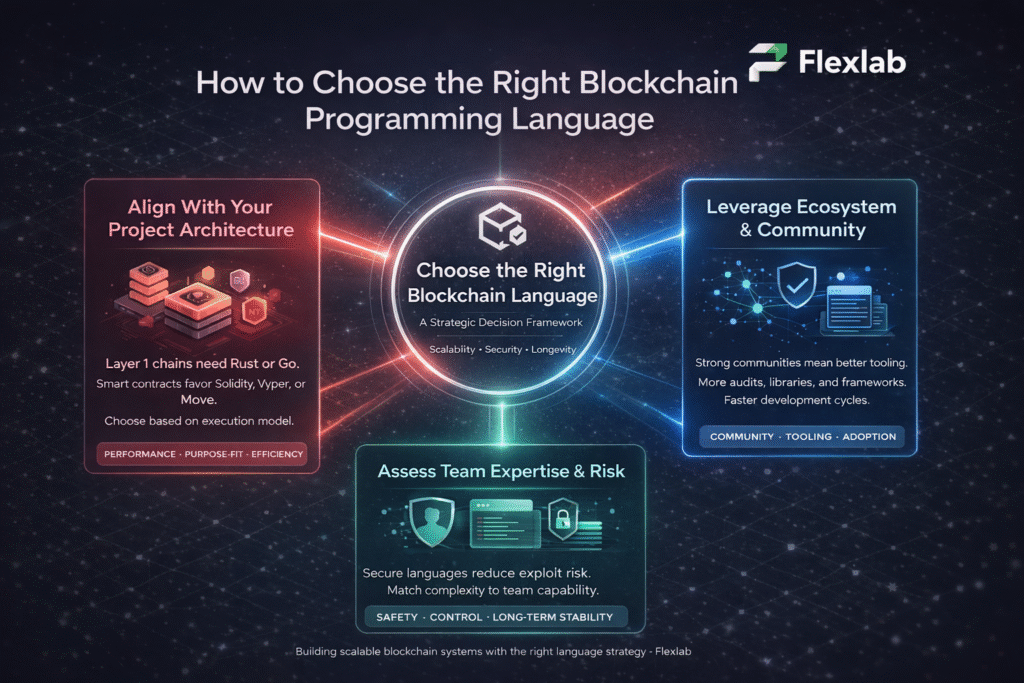

  • Execute Tests

Hook into CI/CD tools like Jenkins or GitHub Actions to run tests on every code push. Additionally, schedule parallel runs for speed and monitor dashboards live. Start with nightly builds, and then move to continuous testing for faster feedback.

  • Analyze Reports and Maintain

Review logs, screenshots, and metrics immediately after runs to log bugs quickly. Then, update scripts for app changes weekly and treat maintenance like code upkeep. Finally, tweak flaky tests and gradually expand coverage for lasting value.

Unlock 70% Faster Releases: Flexlab’s Automation Testing Secrets

Illustration showing a faster software release cycle with Flexlab's AI-powered automation testing

Flexlab, a premier software development company specializing in AI and blockchain, empowers teams to excel in automation testing through comprehensive quality assurance and seamless DevOps services. In addition, they leverage top tools like Selenium, Cypress, and Appium to build custom frameworks that automate unit, integration, UI, and security testing techniques, thereby ensuring robust coverage across web, mobile, and API landscapes.

By integrating security testing for vulnerabilities and compliance early in CI/CD pipelines, we catch issues proactively, minimizing risks without compromising speed. Our DevOps services optimize environments with Jenkins and GitHub Actions for parallel runs and real-time dashboards, while AI-driven maintenance handles flaky tests automatically. 

This approach not only boosts efficiency and reliability but also frees developers for innovation, delivering high-ROI outcomes. As a trusted partner, Flexlab transforms testing from a bottleneck into a strategic advantage, helping Automation-based projects release faster and more reliably.

Ready To Elevate Your Automation Testing Strategy?

📞 Book a FREE Consultation Call: +1 (416) 477-9616

📧 Email us: info@flexlab.io

Final Verdict: Automation Testing

In conclusion, automation testing transforms software development by delivering superior speed, accuracy, wider coverage, early bug detection, optimal resource use, robust regression checks, and clear documentation, outshining manual methods in repetitive, scalable scenarios while complementing human intuition for UX exploration. 

Ready to take a free consultation for Automation testing? Contact us now, visit our LinkedIn page, and explore the blockchain and AI blog page for more insights, tool guides, and discover AI Strategy Consulting, AI Marketing Tools, Generative AI Applications, and Multimodal AI.

FAQs

Q1: What are the skills required for automation testing?

Automation testing requires strong programming skills in languages such as Java, Python, or JavaScript to write robust scripts. Familiarity with tools such as Selenium, Cypress, or Appium is essential for handling UI, API, and mobile tests. Knowledge of CI/CD pipelines like Jenkins, version control with Git, and frameworks like TestNG or pytest boosts efficiency.

Q2: Is automation testing a high-paying job?

Yes, automation testing ranks as a high-paying role, with salaries often ranging from $90,000 to $140,000 annually. Demand surges due to tech growth, skill shortages, and the need for faster release cycles in software firms. Senior roles or those with AI/ML expertise can exceed $160K, especially in hubs like Silicon Valley or remote setups.

Q3:What is an example of automated testing?

A classic example is a Selenium WebDriver script that automates user login on a web application. First, it inputs credentials and submits the form, then verifies successful dashboard access and logs screenshots upon failure. Consequently, this script runs repeatedly in CI/CD pipelines to catch regressions without manual effort. As a result, such tests ensure reliability across browsers like Chrome and Firefox.